
Mean!

This is just mean. Mean, but funny. It’s also awe-inspiring in the same disturbing way that someone who memorizes the Boston phone directory is.
Posted in Programming | Tagged | Leave a comment

Google Code University

Recently, via Hacker News, I came across this link to Google Code University. The University consists of introductions to a variety of subject matter in software development and Web programming. Some are internal courses that Google uses to train their own engineers and others are from outside sources such as Princeton, Stanford, University of Washington, and many more. They have courses on Programming Languages, Web Programming, Web Security, Algorithms, Android, Distributed Systems, Tools, and Google APIs and Tools.

As I have only minimal HTML and CSS skills and no Javascript skills at all, I decided to try out the HTML, CSS, and Javascript from the Ground Up course. It’s about 2 hours long and is broken up into several videos and exercises. There is a zip file with course material so that you can follow along and work the exercises. As you would expect from a 2 hour course, I’m hardly and expert Web designer after going through the material but I did learn some things I didn’t know before. More importantly, I came away with a refined way of thinking about HTML, CSS, Javascript, and the relationships between them.

The course is perfect for someone like me. I let Org-mode do most of the heavy lifting in generating HTML and only occasionally insert HTML code manually to tweak the result. Some of the tricks I learned from the course will help me do this in a more effective way. The CSS material will help me refine the look of my new Home page once I get around to setting it up.

All in all, the course was enjoyable and well worth my time. I will probably try out some of the other courses too. They have a wide variety and many of them look interesting.

Posted in Programming | Leave a comment

Setting the Babel Evaluate Confirm Status

Because Babel provides a facility to execute arbitrary code, it presents a security risk. Code blocks are evaluated when a document is exported as well as when a user explicitly asks for evaluation by typing C-c C-c in the block. To prevent an unwary user from unintentionally executing malicious code, Babel asks for confirmation before executing any code block. That’s a sensible precaution and one that I leave on even though it can be disabled.

There are times, however, when it’s really inconvenient. For example, in the Calling Babel From A Table post, Babel asks for confirmation for each table cell. In that case, I wanted to turn off the confirmation request. You do that by setting org-confirm-babel-evaluate to nil. That’s a long name and if a week goes by without my using it, I won’t remember the name and will have to look it up. It’s also a pain to type. Also, there’s no way to check whether you forgot to turn it back on other than by looking at org-confirm-babel-evaluate.

Here’s a little function that does all that in a convenient way and that has a name short enough to remember. Just add it to your .emacs or init.el file.

(defun babel-confirm (flag)
  "Report the setting of org-confirm-babel-evaluate.
If invoked with C-u, toggle the setting"
  (interactive "P")
  (if (equal flag '(4))
      (setq org-confirm-babel-evaluate (not org-confirm-babel-evaluate)))
  (message "Babel evaluation confirmation is %s"
           (if org-confirm-babel-evaluate "on" "off")))

Calling babel-confirm will tell you if confirmation is on or off. If you give it a prefix argument (call it as C-u M-x babel-confirm) it will toggle the setting and tell you what the new setting is.

If this isn’t fine enough control, you can also set org-confirm-babel-evaluate to a function. The function is passed the language of the code block and the block itself. The function can decide if the block is safe or not and return t to have Babel ask for confirmation or nil to just execute the block. All this is explained in the Org manual’s Miscellaneous section.

Posted in Programming | Tagged | 1 Comment

Kicking the Hornet’s Nest

Bloomberg Businessweek has an article up entitled Sony: The Company That Kicked the Hornet’s Nest. It’s about the break in and Sony’s penchant for suing and prosecuting “hackers.” There’s not much new in the article (although their telling of the story is interesting) but it is, I think, a bad sign for Sony when even Bloomberg is beating up on them. The article makes the point that it will be months, if not years, until the full extent of the damage to Sony, both in dollars and damage to their brand, will be known.

Posted in General | Leave a comment

Fibonacci Run Times

­

This posts combines the results of the last two posts. I thought it would be interesting to compare the actual run times of the three methods of calculating Fibonacci numbers so I put together a Babel table like the one in the Calling Babel From A Table post and ran the experiment. The results were a little disappointing because they didn’t really give me much information. The table below gives the times (in 100 Hz timer ticks) that the 3 methods took to calculate fibn for various values of n. (The code is the same as in the Calculating the Fibonacci Numbers post.)

n Recursive Iterative Logarithmic
10 0 0 0
20 0 0 0
30 15 0 0
40 1899 0 0
50 234539 0 0
100 Too Long 0 0
1000 Too Long 0 0
10000 Too Long 1 0
100000 Too Long 40 0
1000000 Too Long 8952 5

As expected, the recursive method quickly becomes impractical, taking 39 minutes to calculate fib50. The iterative method doesn’t register any time at all until fib10000 and is still under half a second for fib100000. The time for the iterative method to calculate fib1000000 is misleading because the wall clock time was much longer. The reason for that was that it used up all the memory (4 Gigs) and spent a lot of time swapping. Presumably this was the result of the big nums representations taking up memory. Interestingly, I could watch the garbage collector at work. The free memory would get down to a few MB and then start to climb again. Then it would drop again. This happened several times.

The results for the logarithmic method don’t provide much information other than that if you want to calculate fibn for large n you should use that method.

Posted in Programming | Leave a comment

Calculating the Fibonacci Numbers

If, like me, you’re fascinated by the Fibonacci numbers you should take a look at Robin Houston’s The Worst Algorithm in the World post over at the Bosker Blog.

Houston lists and analyzes the three main ways of calculating fib(n):

  • The naïve recursive method that results from programming right from the definition
    (define fib-rec
      (lambda (n)
        (if (< n 2)
            n
            (+ (fib-rec (1- n)) (fib-rec (- n 2))))))
    
  • The iterative method, which can be seen as a dynamic programming solution
    (define fib-it
      (lambda (n)
        (let fib ((k n) (a 1) (b 0))
          (if (zero? k)
              b
              (fib (1- k) (+ a b) a)))))
    
  • The logarithmic method, which is similar to fast exponentiation (see Exercise 1.19 of Structure and Interpretation of Computer Programs)
    (define fib-log
      (lambda (n)
        (define sum-of-squares
          (lambda ( a b)
            (+ (* a a) (* b b))))
        (define fib
          (lambda (n p q a b)
            (cond ((= n 0) b)
                  ((even? n) (fib (/ n 2) (sum-of-squares p q)
                                   (+ (* 2 p q) (* q q)) a b))
                  (else (fib (- n 1) p q (+ (* b q) (* a q) (* a p))
                              (+ (* b p) (* a q)))))))
        (fib n 0 1 1 0)))
    

Readers of this blog will know that the recursive method is horribly inefficient and Houston shows that, in fact, calculating (fib-rec n) takes 2 × fibn+1 – 1 calls to fib-rec. Thus (fib-rec 100) calls fib-rec 1,146,295,688,027,634,168,201 times.

We’re used to seeing just the first few terms (0, 1, 1, 2, 3, 5, …) of the Fibonacci sequence and it’s easy to forget how rapidly it grows. Here are the values of fibn for some relatively small n:

n fibn
0 0
10 55
20 6765
30 832040
40 102334155
50 12586269025
60 1548008755920
70 190392490709135
80 23416728348467685
90 2.880067194370816e+18

Another interesting thing that Houston points out is that the iterative method is actually O(n2) not O(n) as often supposed. That’s because when the numbers get large you must use a multiprecision numeric library and can no longer add the terms in constant time.

Finally, Houston gives a nice way of looking at fib-log and why it works. As I say, this is a really interesting post and worth a few minutes of your time.

Posted in Programming | Leave a comment

Calling Babel From A Table

While I was reading the Lisp Idioms article that I blogged about yesterday, it occurred to me that the first example on accumulating a list presents an excellent opportunity to talk some more about Babel and how to use it with Org-mode tables. It will also give us a nice, if trivial, example of Reproducible Research.

Most Org-mode users are aware of the spreadsheet capabilities of Org-mode tables. You can, for example, sum all the values in a row or column or perform other familiar operations on the data. With Babel, you can also have a cell make a call to a Babel code block to get its value. Whereas in our previous examples we’ve used code blocks to build new tables, in this example we will first build the table and then have the code blocks populate (most of) the cells.

To review, in the Lisp Idioms article one of the examples was of ways to accumulate a list from a stream of values. This is, of course, a common operation in Lisp and Scheme and there are some mildly diverse ways of doing it. Just for variety, we will write our functions in Scheme rather than Common Lisp.

Cons the items onto a list and reverse the results at the end

The most common way of doing this is shown in the first code block. The cntr definition just provides a stream of integers—a new one each time it’s called. The E1 function does the actual work of assembling the list and the let at the end just calls E1 and calculates the time it took to do its work. All this should be very familiar to even beginning Scheme programmers.

(define cntr ((lambda () (let ((k 0)) (lambda () (set! k (1+ k)) k)))))
(define E1
  (lambda (n)
    (let loop ((k n) (lst '()))
      (if (zero? k)
          (reverse lst)
          (loop (1- k) (cons (cntr) lst))))))
(let ((start (get-internal-run-time)))
  (E1 n)
  (/ (- (get-internal-run-time) start) internal-time-units-per-second))

The next code block is almost the same as the first except that it uses reverse! instead of reverse to reverse the list. Theoretically, reverse! should be faster because it reuses the cons cells from the first list rather than making a separate list from scratch.

(define cntr ((lambda () (let ((k 0)) (lambda () (set! k (1+ k)) k)))))
(define E2
  (lambda (n)
    (let loop ((k n) (lst '()))
      (if (zero? k)
          (reverse! lst)
          (loop (1- k) (cons (cntr) lst))))))
(let ((start (get-internal-run-time)))
  (E2 n)
  (/ (- (get-internal-run-time) start) internal-time-units-per-second))

Append the items onto the end of the list

In some sense this is the most intuitive, if naive, method if you are not a Lisp or Scheme programmer. The problem is that append must search down the list each time to find the list’s end and is therefore very inefficient. No serious Lisp or Scheme programmer would ever do this.

(define cntr ((lambda () (let ((k 0)) (lambda () (set! k (1+ k)) k)))))
(define E3
  (lambda (n)
    (let loop ((k n) (lst '()))
      (if (zero? k)
          lst
          (loop (1- k) (append  lst (list (cntr))))))))
(let ((start (get-internal-run-time)))
  (E3 n)
  (/ (- (get-internal-run-time) start) internal-time-units-per-second))

Place the items in a vector in the order in which you retrieve them

This is certainly the fastest method and the one that, say, C programmers would use. Its problem is that you have to know the largest number of items that you can get so that you can preallocate the vector. Common Lisp has a way of extending vectors and the Lisp Idioms article has an experiment for that method but Scheme doesn’t have resizable vectors so we don’t have that case.

(define cntr ((lambda () (let ((k 0)) (lambda () (set! k (1+ k)) k)))))
(define E4
  (lambda (n)
    (let ((vec (make-vector n)))
      (let loop ((k 0))
        (if (= k n)
            vec
            (begin
              (vector-set! vec k (cntr))
              (loop (1+ k))))))))
(let ((start (get-internal-run-time)))
  (E4 n)
  (/ (- (get-internal-run-time) start) internal-time-units-per-second))

Running the experiment

We start with a table like this:

|       n | Reverse | Reverse! | Append   | Vector |
|---------+---------+----------+----------+--------|
|       1 |         |          |          |        |
|       2 |         |          |          |        |
|    1024 |         |          |          |        |
|    4096 |         |          |          |        |
|   16384 |         |          |          |        |
|  262144 |         |          | Too Long |        |
| 1048576 |         |          | Too Long |        |

The code blocks have the same names as in the header. For example, the first code block has a

#+SRCNAME Reverse(n)

just above it. The last two rows of the Append column are set to “Too Long” because the Append method takes too long to run for lists of those sizes. All the other cells in columns 2–5 are empty.

Next, we set the code for each of the empty cells to ‘(sbe @1 (n $1)). This is easily done with the table editor and results in the TBLFM line

#+TBLFM: $2='(sbe @1 (n $1))::$3='(sbe @1 (n $1))::$5='(sbe @1 (n $1))::@2$4..@7$4='(sbe @1 (n $1))

sbe is a macro that calls the code block with the name of its first argument and passes the code block the rest of its arguments. The @1 means row one of the current column and thus refers to the name of the code block from the table header. The $1 in the second argument means column 1 of the current row and thus refers to the n-value for this cell.

Now all we need do is put the point anywhere in the table and type C-u C-c C-c and the table will be filled in with the run times.

n Reverse Reverse! Append Vector
1 0 0 0 0
2 0 0 0 0
1024 0 0 1/100 0
4096 0 0 6/25 0
16384 1/100 0 387/100 0
65536 1/100 1/100 1321/20 1/100
262144 1/25 3/100 Too Long 3/100
1048576 19/100 13/100 Too Long 1/10

get-internal-run-time returns number of 100 Hz ticks used by the Guile interpreter (thus internal-time-units-per-second = 100). As expected, the Vector method is fastest but not by as much as we might expect. The other interesting result is that except for really long lists, reverse! does not outperform reverse to any significant extent. The Append method, of course, is out of the running.

This post is a simple example of Reproducible Research because everything needed to reproduce the post is contained in a single the Org-mode file. If this were a serious research paper, any scientist could request a copy of the file and run the experiments for his or herself.

Update: Corrected the definition of get-internal-run-time.

Posted in Programming | Tagged | Leave a comment

An Oldie but Goodie

I stumbled across this list of Lisp idioms on Hacker News yesterday. I’ve seen it before and if you’ve been around for a while, you probably have too. Still, it’s always fun to read it again. I enjoy the terse elegance of the little snippets of code. Who would not be charmed by this one-liner to take the transpose of a matrix (stored as a list of rows)?

(apply #'mapcar (cons #'list matrix))
Posted in Programming | Tagged | 1 Comment

LastPass and the Press

I’ve written a couple of posts about LastPass recently, both with praise for the way they are handling a potential security event. One might think that I’m a satisfied customer or even an investor but, in fact, I’d never heard of them before I wrote the Doing It Right post. I just think that a company that has a clue and does its best to serve and protect its customers deserves some praise.

That’s why it’s so outrageous that a lazy and ignorant press lumped a potential security event and LastPass’s appropriate response to it with the obviously egregious actions of Sony. It’s not like the facts are hard to understand:

  • Sony
    Stored passwords, personal information, and some credit card information in plain text, used an outdated, unpatched version of Apache, and didn’t bother to install a firewall. When the inevitable attack came and was successful they delayed notifying their customers and were less than transparent when they did.
  • LastPass
    Performed regular, scrupulous reviews of their logs accounting for every anomaly. When a change in the traffic pattern occurred that they couldn’t account for, they proactively warned their customers even though there was no direct evidence of a compromise. They immediately put precautionary procedures in place to ameliorate the damage in case a break in did occur. They kept their customers informed throughout the event with regular updates on their site and an interview with PC World.

How are these two companies’ actions even remotely similar? Yet much of the press treated them as if they were similar. Some even reported as a fact that LastPass had been “hacked.”

Patrick Mylund Nielsen has a nice post over at Throwing Fire that explores this issue a little more deeply but if you really want some red meat about the Tech Press, Michael Arrington over at TechCrunch has got it for you.

Posted in General | Tagged | Leave a comment

R and Babel

I decided to accept my own challenge so I downloaded and installed R. It’s a huge system with a lot to learn but I did manage to figure out enough to generate some basic statistics and a couple graphs. I’ll be using the same data as in the 10,000 Steps post, but I won’t bother to reproduce the table here (it’s in the org file for this post, of course, I’m just not exporting it).

If you want to use R with Babel you really need to read the Org-babel-R page. Babel works a little differently with R and it’s easy to waste a lot of time trying to get things to work because you weren’t aware of those differences.

­

The first thing I wanted to do was calculate some basic statistics from the data. Nothing fancy, just maximum value, minimum value, mean, median, and standard deviation. That’s pretty easy in R because there are R primitives for them.

Here’s the code block for the basic statistics. As before, steps is the table of data. The in[,2] is the second column of that data (it’s a slice of the array that Babel creates from the table for R’s use). I put it in vals just to avoid typing in[,2] over and over. The only tricky part was figuring out how to form the output array but that’s because I don’t really know R yet.

#+BEGIN_SRC R :var inp=steps :exports results
vals <- inp[,2]
array( c("Max", "Min", "Mean", "Median", "Std. Dev.",
  max(vals), min(vals), mean(vals), median(vals),
  sd(vals)), dim=c(5, 2))
#+END_SRC

Here’s the resulting table:

Max 18078
Min 840
Mean 11665.6428571429
Median 12572
Std. Dev. 5372.68656994208

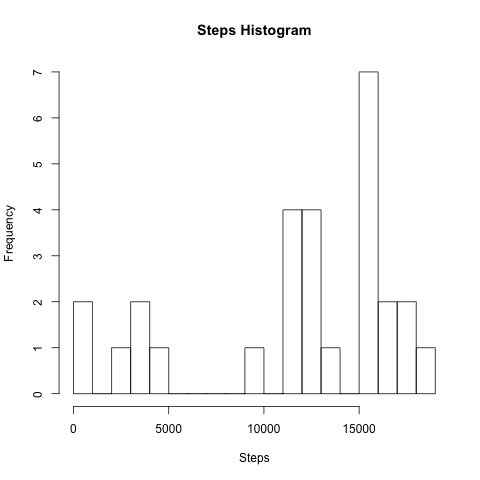
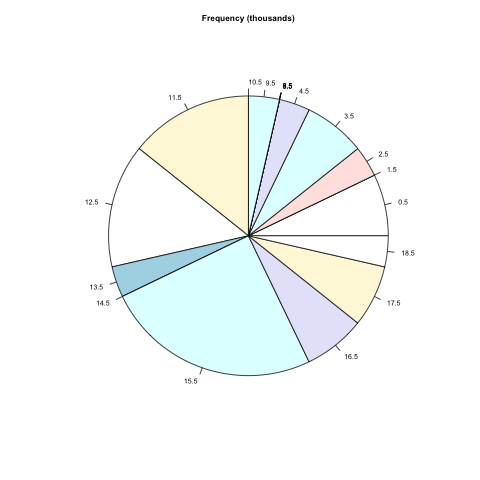
Next I wanted to generate a pie chart showing the distribution of steps in groups of 1,000. I was thinking that I’d have to do some low level programming to build the frequency table. It turns out, however, that R has the hist command that will do that for you. It will even plot a histogram. All you need to do is pass it the data and indicate where you want the breaks to be. This simple code block

#+BEGIN_SRC R :var inp=steps :file http://irreal.org/blog/wp-content/uploads/2011/05/wpid-hist.png :results graphics :exports results
hist(inp[,2], breaks=0+1000*(0:19), plot=TRUE, main="Steps Histogram", xlab="Steps")
#+END_SRC

results in the the following histogram.

http://irreal.org/blog/wp-content/uploads/2011/05/wpid-hist.png
Most of the arguments to hist involve setting the graph and axes labels.

The output of hist is really an object (think structure) that has entries for things like the bucket breaks, bucket midpoints, and bucket counts. You can see that in action in the next code block, which uses hist again but with no plotting. Instead the output object is captured and used as input to the pie primitive.

#+BEGIN_SRC R :var inp=steps :file http://irreal.org/blog/wp-content/uploads/2011/05/wpid-pie-steps.png :results graphics :R-dev-args pointsize=7 :exports results
ftab <- hist(inp[,2], breaks=0+1000*(0:19), plot=FALSE)
pie(ftab$counts, labels = ftab$mids/1000, radius=.75, main="Frequency (thousands)")
#+END_SRC

I had to scrunch up the pie chart a bit to prevent the bucket labels from colliding too much. Still, it’s a nice chart for very little effort.

http://irreal.org/blog/wp-content/uploads/2011/05/wpid-pie-steps.png
If you do any work involving statistics, R is definitely a tool you need. Of course, if you do any work involving statistics, you already know that. Using Org-mode and Babel is a great way to have all the data, graphs, and text for a paper in one file that can then easily be exported to HTML or LaTeX. I’ve said before that I really like Babel and the more I use it and learn about it the more I like it.

Posted in Programming | Tagged | Leave a comment