Roundup of Open Plan Office Research

Jack Schofield over at ZD Net has a nice post on the evils of open plan office layouts. That’s a favored Irreal hobbyhorse, of course, so you might think I’ve said just about everything there is to say about the matter. Schofield’s post is useful because it has links to the multitude of research showing the harm to productivity and employee health that inevitably accompany such plans.

As I’ve stressed many times, the only real benefit of open plan offices is that they’re cheaper. That means facts probably won’t have much of an impact on management but if you think you have a fighting chance, the links may help.

Posted in General | Tagged | Leave a comment

Obscure Math Curiosity of the Day

The Fibonacci sequence: it’s everywhere.

Posted in General | Tagged , | 1 Comment

SBCL 1.2.13 Released

The Steel Bank Common Lisp developers have released version 1.2.13. The release fixes 8 bugs and has a few enhancements for the Windows port and for threading. See the NEWS file for the details.

The system compiled without incident as usual. The regression test error that I wrote about last time is still there so I may have to look into myself. The only other problem is that it’s still being hosted on Source Forge. That’s not a problem for me because I compile from source but if you’re downloading a prebuilt binary, make sure that you don’t click on any of the crapware download buttons that are positioned to look like what you should click to download SBCL.

As I always do, I urge anyone who wants to try out Lisp or who is looking for a first rate CL implementation to give SBCL a try. It’s a great system and one that many use for production systems. Definitely recommended.

Posted in General | Tagged , | Leave a comment

Big Data

Cory Doctorow has an interesting piece in The Guardian positing that in the commercial sphere, if not the world of spies, big data has run its course. I especially like this quote:

The fact that the billions spent spying on everyone, always, has spectacularly failed to catch any terrorists is taken as proof that they’re not doing enough surveillance – not that untargeted, mass surveillance without particularised suspicion is a waste of money.

Posted in General | Tagged | Leave a comment

Magit 2.1.0

I just installed the new version of magit (2.1.0) and even though I’ve made only two commits so far, I really like the new functionality. One of the first things you’ll notice is that when you commit, a diff is popped up in another window so you can see what’s changed. That’s handy when composing a commit message.

It’s very important that you follow the Installation instructions in the new User Manual. This is true even if you’re just updating from one of the ELPA repositories. You must delete

  1. magit
  2. git-commit-mode
  3. git-rebase-mode

and then quit Emacs. Next, restart Emacs and install magit from ELPA. Many of the variable names have been changed so if you are using any in your init.el you will probably need to change them. In my case, I had to change magit-repo-dirs to magit-repository-directories.

This is a big release with lots of new and improved functionality. If, like me, you’re a heavy magit user, you might want to contribute to keep the goodness coming.

Posted in General | Tagged , | 1 Comment

Flash and Security

In an editor’s note to the SANS Newsbites piece on Flash being used as a vector for the ransomware CryptoWall, William Hugh Murray speaks the uncomfortable truth on what Flash tells us about security.

Posted in General | Tagged | Leave a comment

Emacs and Data Science

Robert Vesco has an interesting post on why he uses Emacs in his data science work. Vesco is a data scientist for Bloomberg so he’s a serious practitioner of the art. Working in data science means he uses a variety of languages such as Python, R, SQL, Stata, and SAS. He notes that most of those languages have an associated IDE that simplifies working with them but that that means learning multiple editors and probably mastering none. He also notes that those specialized IDEs may fall out of favor and not be supported in the future, that they are not portable across platforms, and that they are hard to customize.

Happily, those defects do not apply to Emacs. It runs on essentially every (serious) platform, is open source, will be supported for as long as there are a few programmers still interested in using it, and, of course, is famously customizable. One consequence of that customizability is it can become a reasonable IDE for almost any language. That means that a single tool can be used for all those languages and that it’s worthwhile mastering that tool because it’s the only (editing) tool you need to learn.

The bulk of Vesco’s post covers those features of Emacs that he finds most useful in his work. One of those features is Org mode that allows him to use reproducible research methods in his research and publishing. It’s an interesting read even if you’re not a data scientist.

Posted in General | Tagged , , | Leave a comment

org-goto

I learned a really useful Org mode command from Artur Malabarba’s first anniversary post: org-goto. The idea is that you want to navigate to somewhere else in the current Org buffer. You could fold the buffer and navigate to the proper subtree but often you want to leave the current subtree unfolded as well as the subtree you’re navigating to. The org-goto command, bound to 【Ctrl+c Ctrl+j】 by default, allows you to do just that. An copy of the buffer is created with an overlay displaying the buffer in overview mode. You can navigate within that buffer and press 【Return】 on the desired subtree which will take you back to the original buffer with the point at the new subtree.

That may not seem too useful but see Malabarba’s post for a compelling use case. In my case, it’s useful because of the large Org files I use to store my data. When I load such a file via a bookmark or it gets reloaded during a sync from git, it will be completely folded. The files are too large to set them to be completely unfolded so I have to have some way of finding the proper place. I used to call org-sparse-tree and then do a regular expression search for the proper heading. With org-goto, I can simply display the headers, navigate to the desired one, and press 【Return】 to navigate to the proper heading that will be conveniently unfolded. Very handy.

It’s a bit hard to explain how org-goto works so you should experiment with it a bit to see how you can fold it into your workflow. If you use Org files to organize your data as I do, this command is very likely to be a win for you.

UPDATE: There’s a really good discussion of org-goto and related navigation methods in the comments. Be sure to take a look.

Posted in General | Tagged , | 14 Comments

Making My Org Agenda More Useful

I’ve written before (1, 2, 3) about my efforts to implement a system like the one Karl Voit has for managing personal data. Voit uses his Memacs system to automatically collect data from a variety of sources and add them to Org files so that they will appear in his Org agenda. Unfortunately, Memacs was written with the Linux/Android ecosystem in mind so much of it needs a bit work to be usable in the OS X/iOS world.

Nevertheless, many of the ideas (and probably some of the scripts) from Memacs can be used with Org mode on any platform. I keep most of my personal data in 5 Org files: journal, chart (a lightweight quantified self), b-ideas (a queue of ideas and notes for blog posts), todo, and notes. I have capture templates for each of these making it easy to add data. My latest effort to make this data more accessible and useful was to modify the capture templates to add an active time stamp to each entry, causing it to appear in that day’s agenda. For example, here is the capture template for my journal:

("j" "Journal" entry (file+datetree "~/org/journal.org")
         "* %<%R: >%? %^g\n%t")

The %t at the end causes an active date stamp to be added to each journal entry. Thereafter, the headline and tags from the entry will appear in the agenda and selecting that headline will take me directly to the entry.

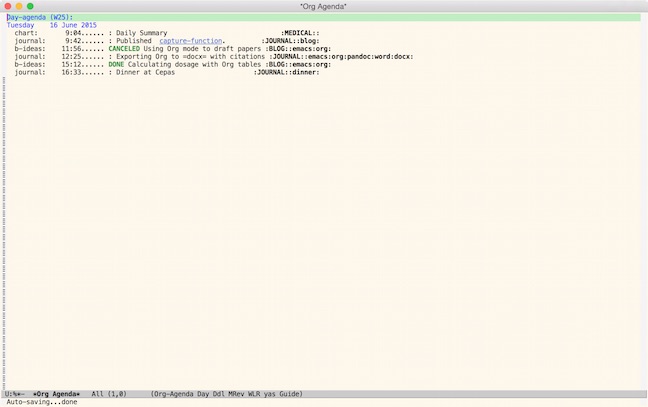
Here’s an example of one day’s agenda. If I want to know what happened on that day, I can jump directly to it in my agenda to find out. If I want to see where I’ve had dinner, I can bring up all the entries with a tag of dinner. It’s a tremendously powerful system that comes almost for free just by arranging for those active date stamps.

day-agenda.jpg

It could be better though. That’s where Memacs comes in. It automatically extracts data from SMS, the Phone’s log, posts, emails, and other data sources. All of the data magically appears in the agenda without having to explicitly capture it. My next step is to adapt some of Voit’s Memacs scripts for my own use.

All this seems pretty geeky but I use the system every day for practical tasks. This morning, for example, I used it to extract data for my tax files. If, as often happens, I find I need to make an update to a blog post, there’s a link to the source file right in the agenda and clicking on it brings up the proper file. As you can see in the example, I also add technical items to my journal. If I need to export an Org file containing citations to docx and don’t remember how, I can search for the docx tag to find the journal entry that contains the details.

Org is tremendously powerful and it pays huge dividends for the effort you expend learning it. One of the nice things about Org is you don’t have to learn everything at once. I keep learning new bits as I find a need for them.

Posted in General | Tagged , | 2 Comments

What is a Hacker?

That’s a notoriously difficult question. Nik Ferrier has his own answer, which seems to me as good as any other I’ve read. Hop on over and see if it resonates for you.

Posted in General | Leave a comment