
GNU Privacy Guard and Emacs

Mickey has an excellent new post on using GnuPG from within Emacs. This is really easy to set up and it’s pretty much transparent once you do. I set it up years ago and until I read Mickey’s post, I’d forgotten most of the details.

The first thing you need is to is enable the EasyPG library. Recent versions of Emacs have this built in but you still need to require and enable it:

(require 'epa-file)
(epa-file-enable)

After that any file with the .gpg extension will automatically be encrypted or decrypted when saving or opening it. The first time you use a particular password in an Emacs session, Emacs will prompt you for it but will remember it for the duration of the session. If you have any asymmetric keys on your keychain, Emacs will ask you which one to use. If you don’t have or choose one, Emacs will prompt you for a symmetric key.

That’s basically everything you need to know for encrypting/decrypting files but, of course, Mickey has more. He shows you how to set up an .authinfo file that contains the keys to certain services so that they can be accessed transparently from Emacs without the need to enter a password every time you use the service. That’s also easy but there are some fiddly details so I’ll let you read about them in Mickey’s post rather than regurgitating them here.

If you’re an Emacs user, you definitely want to read this post. Even if you don’t have any encrypted files, sooner or later you will need to protect some information and by setting up EasyPG now you won’t have to stop and figure things out when you do. All you’ll have to do is remember to add the .gpg to the file name and Emacs will take care of the rest.
Posted in General | Tagged | 5 Comments

Directory-Local Variables

Just in case there’s still anyone out there who isn’t following Artur Malabarba, he has a nice post on something that I had almost forgotten about. It turns out that you can set Emacs variables on a per directory basis. These directory-local variables are especially handy for setting project variables by adding them to the root directory of your project.

The process is easy and Emacs will guide you through it if you call add-dir-local-variable. You can even arrange to have a bit of Elisp code executed so the facility is reasonably general. Take a look at Malabarba’s post for the details. If you’re working on projects where you’d like to have a special configuration, this could be a real help.

Posted in General | Tagged | 3 Comments

A Reminder About Macro Counters

Ben Maughan has a useful reminder about macro counters in Emacs. Although they can be very useful, most of us don’t use them often enough to internalize the details. I’m always glad to see posts like Maughan’s because it reminds me of those details.

Posted in General | Tagged | Leave a comment

SBCL 1.3.7 Released

The latest version of Steel Bank Common Lisp is out. This month’s release fixed a bug and introduced several optimizations. See the NEWS file for details. As usual, the release compiled without incident on my MacBook Pro and the regressions tests all passed.

If you want a really great Common Lisp environment, it’s hard to beat SBCL and Emacs/Slime. Together you have an excellent CL IDE. Even if you’re just getting started or only want to play around, this is an excellent set up.

Posted in Programming | Tagged , | Leave a comment

The Light-Weightedness of Emacs

Most of you know that I really, really love Emacs but it wouldn’t occur to me to describe it as “light weight.” For most of its life, a major complaint about Emacs was that it was so heavy weight. Who can forget the retronym Eight Megabytes And Constantly Swapping? Back when it was coined, 8 megabytes was a lot of memory so the joke is more damning than it may seem to our modern ears.

Therefore, I was a bit surprised when I saw this tweet

Emacs? Light weight? I just smiled and moved on. Later, though, I came across this reddit post that once again described Emacs as light weight.

I’ve been using Emacs or Vim for a long time and don’t have any experience with the newer editors and IDEs but seeing Emacs described as light weight makes me wonder what their performance is like. One thing for sure, it makes me glad I’m an Emacs user, whether or not it’s light weight.

Posted in General | Tagged | 9 Comments

Circuit Simulation with Org Mode

Tiago Oliveira Weber has a wonderful example of using Org mode with a spice application to do circuit simulation. It used to be that when Weber was preparing a report on a project, he opened a spice application in another window and did a lot of copy and pasting to get the waveform results from the spice application into his report. Because Weber likes to tweak the resulting waveforms to make them fit well in the report, there was typically several rounds of copy and pasting.

Now, Weber uses Org mode and Babel instead. That allows him to use literate programming and reproducible research techniques as he prepares his results. It turns out that Org mode already has almost everything needed for this. Carlin J. Vieri has contributed spice-mode to handle fontification of the spice input and Weber wrote ob-spice, a Babel back end. Take a look at Weber’s post for the details.

Posted in General | Tagged , | Leave a comment

Tutorial Update (Week of June 26)

I’ve been following two Emacs/Org tutorial video series from Mike Zamansky and Rainer König. Both series are being updated regularly and worth following by all Emacs and Org mode users.

Zamansky added three more videos to his Using Emacs Series. These are a great set of videos aimed mostly at n00bs but useful for more experienced Emacsers too. For example, his tutorial on swiper convinced me to give it a try.

His new videos cover autocompletion, themes, and keeping your Emacs configuration in an Org file. I’ve written about the last topic myself but Zamansky covers it well and shows how to get the boot strapping set up.

As usual, Zamansky approaches the material from his own workflow point-of-view so he discusses why he likes or dislikes the packages he talks about and why he chose the configuration he uses. The code is available on the individual video web pages and on GitHub.

König has completed another week of videos in his excellent OrgMode Tutorial series. He’s been sticking to his one-video-per-workday schedule so there’s five new videos this week. They are:

  • Ordered tasks
  • Timers
  • Clocking
  • Column view
  • Effort estimates

I thought I understood clocking pretty well but I learned a whole bunch of new things from the last three videos.

I’ve already written about his Timers video; that was material I knew nothing about. I’m sure you’ll learn something new too. I can’t say enough about this series. If you’re an Org mode user you must watch them. Actually, even if you’re not an Org mode user you should watch them. Afterwards you’ll probably be an Org mode user and your life will be easier.

Posted in General | Tagged , | Leave a comment

Knuth’s First Lecture

Back in November of 1969 a young Don Knuth gave his first lecture as a Stanford professor. The lecture was on a new field in Computer Science called Analysis of Algorithms, a field that Knuth invented and named. Recently, Knuth recreated that lecture so that it could be filmed for a university series of videos on important topics. The video is really excellent and everyone in our field should spend the hour to watch it.

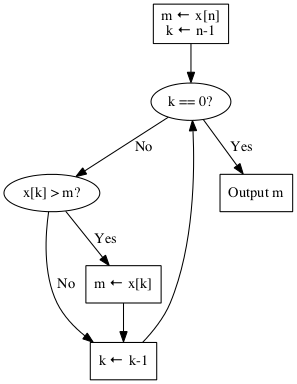
Because the Analysis of Algorithms field was new and mostly unknown, Knuth spent the lecture on an example of analyzing an algorithm. He choose a very simple problem. Given a sequence of numbers \(x_1, x_{2},\ldots,x_n\), find the maximum number, \(m\), in the sequence. We can assume the the \(x_i\) are unique and that every ordering is equally likely. To solve the problem, Knuth chose the obvious algorithm captured by the flow chart below.

max-n.png

At first glance, it’s hard to see what there is to analyze. The algorithm requires an array of size \(n\) and the two additional variables \(m\) and \(k\) for a total of \(n+2\) so it requires \(O(n)\) space. Similarly, it’s easy to see that we go through the loop \(n-1\) times before we terminate so its time is \(O(n)\) too.

In fact, with one exception it’s trivially easy to specify how many times each node in the flow chart is executed. The k == 0? test is made \(n\) times and the x[k] > m test is made \(n-1\) times for example. The one exception is the m ← x[k] box. It is executed only when a new maximum is found. Call the number of times it’s executed \(A\). What can we say about it?

Obviously, \(A=0\) when the maximum number is last in the sequence and it’s \(n-1\) when \(x_1 > x_2 > \ldots >x_n\) but what is its average (or expected) value? If you don’t think about it too hard, \(n/2\) seems like a good guess.

It’s easy to calculate the \(n=3\) case and when you do, you find that the average value of \(A\) is \(5/6\) so our \(n/2\) guess is incorrect. Most of the lecture is spent finding the correct answer, which turns out to be \(H_{n}-1\) where \(H_n\) is the \(n\)th partial sum of the harmonic series. Therefore, \(A \approx \ln(n)\) and the average value of \(A\) for \(n=1,000,000\) is about 13.5; much different from what you might have expected.

Knuth says that the techniques he uses in this analysis appear over and over again so the simple problem turns out to be an important and instructive example. If you’d like to explore the analysis at your own pace, you can find the same example in Section 1.2.10 of AOCP.

Posted in Programming | Tagged | Leave a comment

Relative Dates with Org Mode

It’s easy to forget how flexible Org mode date entry can be. Here’s a helpful reminder from @goaoio.

Posted in General | Tagged , | Leave a comment

Timers

The latest video from Rainer König discusses countdown and relative timers. These aren’t the clock-in, clock-out timers—used to log time spent time spent on tasks—that you may be used to. They’re a separate facility that I didn’t know about before I watched the video.

You start the first type of timer, the countdown timer, by typing 【Ctrl+c Ctrl+x ;】 after which Org asks you to specify a time and then starts counting down from that time. When the time expires, Org mode gives you an expiration notice. In the video, Org pops up a message box. In my Emacs configuration, I get the message in the minibuffer. In either case, the current time remaining is shown on the mode line.

As König explains, this is useful if you want to work on a task for a specific amount of time before moving on to something else. You can pause and restart the timer with 【Ctrl+c Ctrl+x ,】 and stop it entirely with 【Ctrl+u Ctrl+c Ctrl+x ,】.

The second type of timer, the relative timer, is useful for taking notes with times as some event is taking place. For example, if you are taking notes on König’s video, you can start a relative timer and have your notes keyed to the video by the elapsed time. It’s the sort of thing that Sacha Chua does with the notes for her videos, although I don’t know if she uses relative timers to do it.

To start a relative timer, you type 【Ctrl+c Ctrl+x 0】 and the timer starts from 0. You can input a starting time by preceding the sequence with the universal argument.

When the timer is running, the current time is shown in the mode line and you can insert the time as a string with 【Ctrl+c Ctrl+x .】. More usefully, you can make an entry in an item list with the current time by typing 【Ctrl+c Ctrl+x -】. You can add subsequent entries in the list by typing 【Meta+Return】 as usual. That’s perfect for the type of transcripts that we discussed above.

You can use the same sequences to pause/restart/stop the timer as you did with the countdown timer. If you’re using the excellent which-key, it will prompt you for these sequences if you can remember the 【Ctrl+c Ctrl+x】 prefix. That’s not too hard because many Org actions of this sort (including the clock-in/out commands) start with the same prefix.

This is a really excellent video and you should definitely watch it. It’s only seven and a half minutes so it’s easy to find time for it.

Posted in General | Tagged , | Leave a comment