Another Emacs Trick

I just stumbled across another feature of Emacs that is new to me. If you save files by typing C-x s, then for each dirty buffer Emacs will ask if you want to save it. By answering d Emacs will present you with a diff of the buffer and the on-disk file. Then you can then answer y or n to save the buffer or not. Of course, you can do this at any time by typing M-x diff-buffer-with-file but the ability to take a diff at the last second before saving the buffer is sometimes useful.

Even better is where I learned this. The twitter feed @ecotd (Emacs Command of the Weekday) presents one of these tidbits every week day. The feed has been inactive recently but today brought this nugget. Follow the link to see all the tweets. There’s a lot of Emacs goodness there.

Posted in General | Tagged | Leave a comment

A Practical Application of Gray Codes

Gray codes are a way of encoding a a sequence of integers {0, 1, 2, …, n} so that the binary representation of adjacent integers differs by only 1 bit. For example, the1 Gray encoding for the sequence {0, 1, 2, 3, 4, 5, 6, 7} is {000, 001, 011, 010, 110, 111, 101, 100}.

It’s easy to calculate the Gray code for any integer, j: it’s simply j ⊕ j/2 . We can express this in Scheme as

(define d->g
  (lambda (j)
    (number->string (logxor j (quotient j 2)) 2)))

When we evaluate d->g with 4 we get 110 as expected.

Going from a Gray Code back to its binary equivalent is a little harder. The binary number equivalent to the Gray code k is k ⊕ k/2 k/4 ⊕ … where the zero terms are dropped. Since k/2n is 0 for large enough n, the sequence terminates.

We can implement this in Scheme as

(define g->d
  (lambda (k)
    (let loop ((k (quotient k 2)) (result k))
      (if (zero? k)
          result
          (loop (quotient k 2) (logxor k result))))))

Why do this? Gray codes are useful in situations where analog information is being converted to digital information or vice versa. It often happens that there are ambiguities where, say, an analog value changes from one value to the next. In section 7.2.1.1 of AOCP V. 4A, Knuth gives the example of a disk divided into 16 sectors with concentric colored bands marking the bit values of each sector. At the sector boundaries it’s unclear what the correct values are and encoding them in the normal binary encoding can lead to large errors. With the Gray coding, the errors are always localized to one bit so that the values are never more than one off. That explanation is a little hard to follow without Knuth’s diagram and is, in any event, not a real application (although one can imagine the same basic scheme being used in one).

Mark Dominus over at The Universe of Discourse has a nice post from 2009 that shows a perfect real-world application of Gray codes. It’s a stadiometer, a device used in medical settings to measure a person’s height. Commonly they are attached to a scale and consist of a slider that can be moved up and down a column marked with the heights and a piece that sticks out and rests on the top of the patient’s head. We’ve all been measured by one of these and usually the doctor or nurse just reads off the number from the column. In Dominus’ example, the stadiometer was digital and worked by a photosensor reading a pattern from the column. That pattern turns out to be a Gray code and, as Dominus illustrates, is used precisely to avoid measurement errors when the slider is between two possible height values.

Follow the link to see a picture of the column with its Gray codes and a worked example of how large the measurement error can be if normal binary encoding were used.

Footnotes:

1 Perhaps we should say a Gray encoding since there are many possible encodings. The one given here is the one specified by Gray.

Posted in General | Tagged | 1 Comment

Expanding File Names in Guile

I really like Guile but one very annoying thing about it is that it doesn’t expand file paths. If you want to load a file outside the current directory you have to specify the complete path. Emacs has a very helpful function, expand-file-name, that takes care of expanding file names. For example,

(expand-file-name "~/scheme/somefile.scm")

results in

/Users/jcs/scheme/somefile.scm

I wanted something similar for Guile so I added my own version, loosely modeled on the Emacs function, to my .guile file

(define expand-file
  (lambda (f)
    (cond ((char=? (string-ref f 0) #\/) f)
          ((string=? (substring f 0 2) "~/")
           (let ((prefix (passwd:dir (getpwuid (geteuid)))))
             (string-append prefix (substring f 1 (string-length f)))))
          ((char=? (string-ref f 0) #\~)
           (let* ((user-end (string-index f #\/))
                  (user (substring f 1 user-end))
                  (prefix (passwd:dir (getpwnam user))))
             (string-append prefix (substring f user-end (string-length f)))))
          (else (string-append (getcwd) "/" f)))))

I use this in conjunction with another function, require-file, that loads the file if it’s not already loaded. The require-file function lives in my .guile too.

;; load a file unless it's already loaded
(define loaded-files '())
(define require-file
  (lambda (f)
    (let* ((ffn (expand-file f))
           (fsym (string->symbol ffn)))
      (if (not (memq fsym loaded-files))
          (begin
            (load ffn)
            (set! loaded-files (cons fsym loaded-files)))))))

Now I can simply write something like

(require-file "~/scheme/lib/some-file.scm")

and have it loaded without worrying about specifying the full path name. This is especially handy when I’m using Guile interactively at the REPL. The checking if a file is already loaded is probably overkill but it seemed like a good idea when I wrote the code.

Posted in Programming | Tagged | Leave a comment

Literate Programming and GTD With Org Mode

Over at Eden Cardim’s Blog, there are a couple of nice posts about GTD (Getting Things Done) with Emacs Org Mode. One interesting thing about the posts is that Cardim uses the Literate Programming approach to his .emacs file but in a slightly different way from what I described in my Cleaning Up My Emacs Environment post. He keeps everything in a single file but puts the snippets of Emacs Lisp in code blocks and surrounds it with commentary explaining why he made a particular setting. In fact, the post is actually an exported portion of his emacs.org file: the one file is used to build his .emacs and also to blog about it. Very nice. I’ve never been able to warm up to Literate Programming but I do appreciate the elegance of Cardim’s approach. The post gives a link to github where you can download his original emacs.org file and see how he put it together. Well worth a look, especially if you think you might like his approach.

Posted in General | Tagged | Leave a comment

Boolean Functions

Boolean functions are very simple. If B = {FALSE, TRUE } then a Boolean function of n variables has domain Bn and range B; that is f: Bn → B. This limits the number of possible functions. For example, there are only 2 Boolean functions of 1 variable: f(x) = x and f(x) = ¬ x.

The case of two variables is only slightly more complex. Let’s adopt the usual convention that 0 is FALSE and 1 is TRUE. The two variables can each take on two values so there are four possible inputs: (x, y) = (0, 0), (0, 1), (1, 0), and (1, 1). A given function f: B2B can take on either of two values for each of the 4 inputs so there are 24 = 16 Boolean functions of two variables. It’s easy to list them. Let’s agree to represent a function by the sequence of four numbers f (0, 0), f (0, 1), f (1, 0), f (1, 1). Then the 16 functions of two variables are: 0000, 0001, 0010, …, 1111. If we think of the sequence of four numbers as a single binary number, we can name and completely describe a function just by its number. For example function 10 (1010) is ¬ y—it is TRUE exactly when y is FALSE. A slightly more complex example is function 1. It is x AND y. Similarly, function 13 is ¬ x OR y. Knuth shows in section 7.1.1 of AOCP v. 4A that every Boolean function can be written in terms of the operators AND, OR, and NOT.

All this serves as an introduction to a splendid post by Russ Cox. He wonders what the minimal number of AND and OR operations it takes to express the Boolean functions of n variables. Back in 2001 he calculated the answer for n = 4 using a method similar to the one shown below. That’s harder than you might think because there are 216 Boolean functions of 4 variables and since you build them up by combining pairs of functions with AND and OR there are 216 × 216 = 232 pairs of functions. It turns out that 15 is the minimum number for 4-variable functions.

Until recently, the answer wasn’t known for n = 5. The reason for that is that when n = 5, the number of pairs of functions is 264 and the total amount of work is on the order of 30 × 264—too much to do using the brute force method that works for n ≤ 4. Russ’s post is mostly about how he and Alex Healy were able to reduce the amount of work enough to calculate the n = 5 case. The answer is 28. The n = 6 case is too large for any sort of brute force method to work.

In order to help me understand his post, I recreated the brute force method he described for n ≤ 4. The Scheme code below calculates the number of AND/OR operations that each function takes as well as the implementation of the function in terms of AND and OR. To understand the code, notice that given two functions f and g you can calculate f AND g and f OR g simply by performing the operation on their numbers. For example, if f is function 4 and g is function 2 then f AND g = 0100 AND 0010 = 0000 = function 0, and f OR g = 0100 OR 0010 = 0110 = function 6.

The strategy is to set the number of operations for each function other than the single variable functions (x, y, ¬ x, ¬ y) to ∞ and the single variable functions to 0 (since they don’t require any AND/OR ops. Then the AND and OR operations are performed on each pair of functions and if opsf + opsg + 1 < opsf ⊗ g (where ⊗ is either AND or OR) then set opsf ⊗ g to opsf + opsg + 1. This is done repeatedly until there are no further changes.

This code calculates to n = 2 case but it is easily extended to n = 3 and, in principle, to n = 4 although the interpreted guile may run too slowly in that case.

(define x 3)
(define notx 12)
(define y 5)
(define noty 10)
(define infinity +inf.0)
(define d (make-vector 16 infinity))  ; number of and/or ops
(define defs (make-vector 16))        ; function definitions

;; Initialize single variable functions (x, y, not x, not y)
(define funcs (list x notx y noty))
(define predefined (list "x" "(NOT x)" "y" "(NOT y)"))
(for-each (lambda (f) (vector-set! d f 0)) funcs)
(for-each (lambda (f p) (vector-set! defs f p)) funcs predefined)

;; Closure to track whether any functions changed
(define changed (let ((c #t)) (lambda x (if (null? x) c (set! c (car x))))))

;; Calculate function definitions and number of and/or ops
(let ((newfuncs '()))                 ; newly created functions this round
  (while  (changed)
    (changed #f)
    (set! funcs (append funcs newfuncs))
    (set! newfuncs '())
    (let outer ((f-funcs funcs))
      (unless (null? f-funcs)
        (let inner ((f (car f-funcs)) (g-funcs funcs))
          (unless (null? g-funcs)
            (let* ((g (car g-funcs))
                   (forg (logior f g)) (fandg (logand f g))
                   (d-g (vector-ref d g)) (d-f (vector-ref d f))
                   (cd (+ d-f d-g 1)))
              (when (< cd (vector-ref d forg))
                (changed #t)
                (push forg newfuncs)
                (vector-set! d forg cd)
                (vector-set! defs forg (format #f "(~a OR ~a)"
                                               (vector-ref defs f)
                                               (vector-ref defs g))))
              (when (< cd (vector-ref d fandg))
                (changed #t)
                (push fandg newfuncs)
                (vector-set! d fandg cd)
                (vector-set! defs fandg (format #f "(~a AND ~a)"
                                                (vector-ref defs f)
                                                (vector-ref defs g))))
              (inner f (cdr g-funcs)))))
        (outer (cdr f-funcs))))))

Here’s the results of running the above.

n Function Definition Ops
0 0000 (x AND (NOT x)) 1
1 0001 (x AND y) 1
2 0010 (x AND (NOT y)) 1
3 0011 x 0
4 0100 ((NOT x) AND y) 1
5 0101 y 0
6 0110 (((NOT x) OR (NOT y)) AND (x OR y)) 3
7 0111 (x OR y) 1
8 1000 ((NOT x) AND (NOT y)) 1
9 1001 (((NOT x) AND (NOT y)) OR (x AND y)) 3
10 1010 (NOT y) 0
11 1011 (x OR (NOT y)) 1
12 1100 (NOT x) 0
13 1101 ((NOT x) OR y) 1
14 1110 ((NOT x) OR (NOT y)) 1
15 1111 (x OR (NOT x)) 1

All of that is the easy part. Read Russ’s post to see how they solved the n = 5 case. It’s a great read and, as usual with Russ, an example of first-rate engineering.

I started this post by saying that Boolean functions are simple. They may be simple in their basic structure but that doesn’t mean they’re trivial. Indeed, Knuth devotes over 200 pages to them in volume 4A of AOCP. There are lots of open, hard problems involving them. For example the satisfiability problem, which Knuth describes as the most famous unsolved problem in Computer Science, asks for an efficient method of deciding whether or not a Boolean function is identically zero. That seems easy enough but has resisted efforts for even some simple cases. Nevertheless, it’s a problem of tremendous practical importance.

Update: Fixed potential bug in code.

Posted in Programming | Tagged | Leave a comment

Huffman Coding

Over at Harder, Better, Faster, Stronger, Steven Pigeon has a nice post on Huffman codes. He explains how Huffman codes operate and works through a pencil and paper example. Because he doesn’t give a real implementation and because the usual implementation uses a priority queue, I’d like to continue his discussion here. Take a minute to read Pigeon’s post so that you can more easily follow along.

Once you have the priority queue, the rest is pretty simple. Following the original post, we’ll build the Huffman code for the symbols a, b, c, d, and e with frequencies 3, 3, 2, 1, 1 respectively. We encode that as

(define nodes '((b . 3) (a . 3) (c . 2) (d . 1) (e . 1)))

I switched the order of the a and b nodes so that I get the same tree as he does instead of the equivalent tree with the roles of a and b reversed. Here’s the code to build the Huffman tree:

 1:  (define huffman
 2:    (lambda (nodes)
 3:      (define less?
 4:        (lambda (a b)
 5:          (< (cdr a) (cdr b))))
 6:      (let ((q (make-heap (length nodes) less?)))
 7:        (for-each (lambda (n) (q 'push n)) nodes)
 8:        (let loop ((right (q 'pop)) (left (q 'pop)))
 9:          (if (not left)
10:              (car right)
11:              (begin
12:                (q 'push (cons (list (car left) (car right))
13:                               (+ (cdr left) (cdr right))))
14:                (loop (q 'pop) (q 'pop))))))))

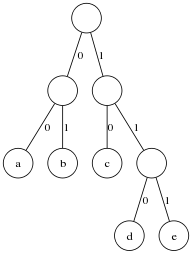
Lines 3–5 define the comparison function less?, and lines 6 and 7 make and fill the priority queue. The actual building of the tree is on lines 8–14. Just as explained in Pigeon’s post, the two nodes with the lowest frequencies are popped off the queue and replaced by a new node that combines them. This is repeated until the queue has only one entry and then that entry is returned. When we run this with nodes we get

((a b) (c (d e)))

which is the tree

http://irreal.org/blog/wp-content/uploads/2011/05/wpid-huffman-tree.png

where I’ve labeled the left edges 0 and the right edges 1. You can easily read off the codes for a, b, c, d, and e from the tree. Here is the code to do it programnatically:

(define print-codes
  (lambda (tree)
    (define walk
      (lambda (code tree)
        (if (not (pair? tree))
            (format #t "~s ~s\n" tree (reverse code))
            (begin
              (walk (cons 0 code) (car tree))
              (walk (cons 1 code) (cadr tree))))))
    (walk '(0) (car tree))
    (walk '(1) (cadr tree))))

As you can see, it does a depth-first search of the tree recording its path as it goes. When it reaches a leaf node, it prints the name of the node and its path. Running it on the tree ((a b) (c (d e))) yields

a (0 0)
b (0 1)
c (1 0)
d (1 1 0)
e (1 1 1)

Decoding is similar to print-codes:

(define decode
  (lambda (msg tree)
    (define walk
      (lambda (msg tree)
        (cond
         ((not (pair? tree)) (cons msg tree))
         ((zero? (car msg)) (walk (cdr msg) (car tree)))
         (else (walk (cdr msg) (cadr tree))))))
    (let ((symbol (walk msg tree)))
      (format #t "~s " (cdr symbol))
      (if (not (null? (car symbol)))
          (decode (car symbol) tree)
          (newline)))))

It walks the tree guided by the message’s zeroes and ones. When it reaches a leaf, it prints the leaf’s name and starts over with the rest of the message.

There’s no requirement, of course, that the symbol be a single character. If we run huffman as

(huffman '((to . 2) (be . 2) (or . 1) (not . 1)))

we get the tree

((be (or not)) to)

and the codes

be (0 0)
or (0 1 0)
not (0 1 1)
to (1)

and can then encode “to be or not to be” as 1 0 0 0 1 0 0 1 1 1 0 0.

Posted in Programming | Tagged | Leave a comment

Heaps and Priority Queues

In a previous post, I talked about FIFO queues and gave an implementation. Now I want to talk about another type of queue: the priority queue. In these queues every element has a priority and elements are removed from the queue in order of their priority. Thus the element with the lowest (or highest) priority is removed first regardless of the order in which it was inserted. A naïve way to implement a priority queue is simply to sort it by priority after the elements are inserted. The problem with that implementation is that sorting can be a heavyweight operation. That would be OK if you only had to do it once, but usually items are being popped off and pushed on the queue repeatedly so that it would have to be resorted every time a new element is added.

The traditional way of implementing priority queues is with a binary heap. This has the advantage that removal and insertion are O(log n). Here’s an implementation of a binary heap from my standard library.

 1:  ;; Make a heap. Size is the total number of entries that the heap will
 2:  ;; hold, less? is a function to compare the values of two entries, and
 3:  ;; move-hook is a function that will be called everytime an object is
 4:  ;; moved in the heap. It is called with the arguments object and slot-number.
 5:  ;; Arguments to the resulting heap are:
 6:  ;; 'push obj -- Push obj onto the heap and move it to its correct position
 7:  ;; 'pop -- pop off the top object and fix the heap
 8:  ;; 'recalc slot -- the object in slot slot has changed its value. Move it to
 9:  ;;                 its correct position
10:  ;; 'map f -- Apply f to (slot . object) for every entry in the heap
11:  ;; 'show -- dump the current size of the heap and the heap array
12:  
13:  (define make-heap
14:    (lambda (size less? . move-hook)
15:      (let ((h (make-vector (1+ size))) (used 0)
16:            (hook (if (null? move-hook) (lambda x #t) (car move-hook))))
17:        (letrec ((up-heap (lambda (c t)
18:                            (let ((p (quotient c 2)))
19:                              (if (or (= c 1)
20:                                      (less? (vector-ref h p) t))
21:                                  (begin
22:                                    (vector-set! h c t)
23:                                    (hook t c))
24:                                  (begin
25:                                    (vector-set! h c (vector-ref h p))
26:                                    (hook (vector-ref h p) c)
27:                                    (up-heap p t))))))
28:                 (down-heap (lambda (p t)
29:                              (let ((lc (* p 2)))
30:                                (if (> lc used)
31:                                    (begin
32:                                      (vector-set! h p t)
33:                                      (hook t p))
34:                                    (let ((rc (1+ lc)))
35:                                      (if (and (<= rc used)
36:                                               (less? (vector-ref h rc)
37:                                                      (vector-ref h lc)))
38:                                          (set! lc rc))
39:                                      (if (less? t (vector-ref h lc))
40:                                          (begin
41:                                            (vector-set! h p t)
42:                                            (hook t p))
43:                                          (begin
44:                                            (vector-set! h p (vector-ref h lc))
45:                                            (hook (vector-ref h lc) p)
46:                                            (down-heap lc t)))))))))
47:          (lambda (cmd . data)
48:            (case cmd
49:              ((push) (set! used (1+ used))
50:               (if (> used size)
51:                   (error #f "HEAP: heap full")
52:                   (up-heap used (car data))))
53:              ((pop) (let ((result (vector-ref h 1)))
54:                       (set! used (1- used))
55:                       (if (negative? used)
56:                           #f
57:                           (begin
58:                             (down-heap 1 (vector-ref h (1+ used)))
59:                             result))))
60:              ((recalc) (let ((i (car data)))
61:                          (cond
62:                           ((= i 1) (down-heap 1 (vector-ref h 1)))
63:                           ((= i used) (up-heap used (vector-ref h used)))
64:                           ((less? (vector-ref h i) (vector-ref h (quotient i 2)))
65:                            (up-heap i (vector-ref h i)))
66:                           (else (down-heap i (vector-ref h i))))))
67:              ((map) (let ((f (car data)))
68:                       (let mapper ((ix 1) (result '()))
69:                         (if (> ix used)
70:                             (reverse result)
71:                             (mapper (1+ ix)
72:                                     (cons (f (cons ix (vector-ref h ix)))
73:                                           result))))))
74:              ((show) (list used h))
75:              (else (error "HEAP: illegal command:" cmd))))))))

Sometimes events external to the queue will cause the priority of one of its entries to change—this happens with the Dijkstra’s shortest path algorithm, for example. To handle these cases, you can specify a function to be called whenever an object moves in the heap. That way you can keep track of its position in case you need to adjust its priority. The recalc method will move an entry whose priority has been changed to its new correct position in the heap.

Despite its name, less? can be written to choose the element with the larger priority instead of the smaller. In that case, entries with the higher priority are removed first.

All of the real work is done in up-heap (lines 17–27) and down-heap (lines 28–46). Items are inserted into the queue with the push command (line 49) by putting them at the end of the queue and calling up-heap to move it into its final position. The next item to be removed is popped off the queue with the pop command (line 53) by returning the entry in slot 1 of the queue (slot 0 is not used) and then putting the entry in the last slot into slot 1 and calling down-heap to move it to its correct position.

The push and pop commands are the standard heap operations familiar from any basic algorithms book or course. This implementation also has the afore mentioned recalc command and a map command. For debugging, the show command will display the size of the queue and the vector that holds the queue entries.

In my next post, I will give an example that uses a priority queue.

Posted in Programming | Tagged | Leave a comment

Sedach on Lisp Macros

Via Loper OS, here’s Vladimir Sedach on Lisp macros. He points out that the purpose of programming is automation and that once having realized that the next question is, “How can we automate our programming?” Sedach goes on to argue that macros are the only general system we have for that—they are, after all, little programs that write code—and that not having macros means that you don’t understand why you are writing code. He make some other, less controversial, points as well.

It’s a good read and at only 5 short paragraphs it will only take you a minute or two to do so. If you like it, you might want to head over to Loper OS to see what Stanislav Datskovskiy has to say about it.

Posted in General | Tagged | Leave a comment

Cleaning Up My Emacs Environment

While I was installing magit the other day, I decided it was a good time to do a little digital house cleaning. I keep all my important file groups—writing, software development, blogging, and personal—in Git repositories. Oddly, given that these all flow through Emacs, I didn’t have my Emacs environment in Git. As I wrote yesterday in my Magit post, one of the primary uses for these Git repositories is to keep my various machines in sync so not having .emacs.d in Git made no sense at all.

Part of the problem was some early poor choices on my part. I installed the Org-mode distribution as a subdirectory of .emacs.d. There’s nothing necessarily wrong with that but I had it in there as a Git repository. A while back I decided to try to put .emacs.d in Git but the nested Git repositories didn’t work out so well—not at all, in fact. When I finally got around to installing magit I already had some Emacs packages in my tools directory, so I moved the Org-mode repository out of .emacs.d and into tools. I had already replaced .emacs with init.el in .emacs.d so all I had to do was initialize .emacs.d as a Git repository, clone it as a bare repository, and move the cloned repository to the server with the rest of the repositories.

Many people like to break their .emacs into several files with a separate file for each mode or function. Some even use Babel’s literate programming facilities to tie everything together. I keep everything in one file otherwise I’d never be able to find anything. That means that I don’t have much in my .emacs.d but init.el and some elisp files for small packages that don’t need their own subdirectory. Here’s what it looks like

auto-save-list/
dired+.el
dired+.elc
gnuplot-gui.elc
gnuplot.elc
htmlize.el
init.el
paredit.el
quack.el
slime/
tramp
tutorial/
xml-rpc.el

Looking at that list, I could probably get rid of quack.el since Geiser has pretty much taken over its functions. Unfortunately the .emacs.bmk file lives in my home directory by default and there doesn’t appear to be a way to change it. That’s not really a problem for me because I don’t use book marks but it would be nice to get everything in one place. I suppose I could set a symbolic link if I did start using them.

Posted in General | 6 Comments

Magit

One of the first things I did when I started using Emacs was to install the git.el package that interfaces with Git. I chose git.el because it worked the same as the rest of the Emacs source control interfaces. There’s not much to do to install the package but somehow I must have messed it up because I could never get it to commit.

I use Git mostly to keep versioned backups of my work and to move data between the machines that I use. I have Git repositories on a local server that I can push to and pull from. It’s not hard to pop into a shell buffer and just call Git by hand and that’s what I fell into doing. Every once in a while I would try M-x git-status again and, of course, it still didn’t work. I checked that I had the latest version but other than that I didn’t look into the problem further.

All this time, what I really wanted to use was magit but I had it in my head that it was better to stick with a package that had a UI the same as for all the other SCM systems. Then one day it occurred to me that I use only Git and that, gee, maybe I could learn another interface if the need arose. But I still didn’t install magit. I know, I know, I’m a lazy, lazy person.

A few days ago I saw this video by Alex Vollmer and decided that I really should give it a spin. I’m very pleased that I did. The result is similar to what happened when I discovered I could FTP right out of dired. It hasn’t changed my life but it has made my work flow easier and more efficient. Even more important, I find that I do a lot more commits and pushes than I did before. I used to put off committing until I had several files or until I needed to refresh my files on another machine. Now it’s so simple that I do it as soon as I finish with a file. That means the repositories on the server are always up to date and I don’t have to trudge over to my main machine to push everything so that I can pull it onto another machine—I just pull and get the latest files.

It turns out that magit is very sensitive to the .git/config files so if you want to use it you will need to get those right. Here’s what I have for my local set up.

[core]
        repositoryformatversion = 0
        filemode = true
        bare = false
        logallrefupdates = true
        ignorecase = true
[remote "org-repo"]
        fetch = +refs/heads/*:refs/remotes/org-repo/*
        url = ssh://bedia/home/jcs/repos/org.git
[branch "master"]
        remote = org-repo
        merge = refs/heads/master

The [core] section of the configuration was auto-generated by Git, and the [branch "master"] section was generated by magit. That leaves the fetch line in the [remote "org-repo"] section. If you don’t have that, things will still work, mostly, but you get error messages in your magit-status buffer for some of the remote items.

Posted in Programming | Leave a comment