
An Implementation of Diceware

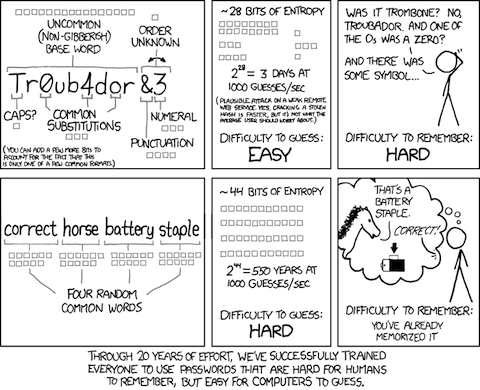
A few of my recent posts (1, 2, 3) discussed the Diceware method of choosing a password. The idea is that you roll a die 5 times to get a 5 digit number and use that number to look up a word in a list of 7,776 words. If you do this 5 or 6 times you end up with enough random words for a strong password that is reasonably easy to remember. All of this discussion, here and elsewhere on the Web, were precipitated by this XKCD cartoon, which explains the rationale for the idea well.

As an amusing little side project that might be useful to some, I implemented a software version of the Diceware method. You just run the utility specifying how many words you want and out pop that many words. Although the Diceware page recommends against doing a software implementation, mine uses a cryptographically strong pseudo-random number generator and should be at least as secure as actually rolling a die.

Before we begin, there are 2 points worth mentioning:

  1. This is a good way to generate a “master password” that is used to protect your other passwords (I’ll say more about this in the next post). As Troy Hunt pointed out you shouldn’t use this method or any other to try to remember all your passwords.
  2. People find it very difficult to believe that 5 random words from a list of only 7,776 could constitute a strong password. One commenter on Hunt’s post even claimed that such a system could be broken in a matter of seconds. The key here is that the words are chosen at random. How many ways are there to choose 5 words from that list? Well, you can choose the first one 7,776 ways, and the second one 7,776 ways and so on so that there are 77765 = 28,430,288,029,929,701,376 ≈ 264 ways. That is, those 5 words have 64 bits of entropy. Because they were chosen randomly there are no patterns to exploit so the entire search space must be examined. How long would that take? Assuming (very generously) that you could check 1,000,000 passwords a second, it would take over 900,901 years. Throw in another word and it would take over 7,005,409,781 years.

First, I downloaded the word list from the Diceware site. A typical line of the list looks like

21124 clip

so I cut out the numbers leaving just the list of words, one to a line, and renamed it diceware.txt.

Here’s the actual C code.

 1:  #include <stdio.h>
 2:  #include <string.h>
 3:  #include <stdint.h>
 4:  #include <openssl/rand.h>
 5:  
 6:  #define NWDS    7776
 7:  #define MAXWDSZ 10
 8:  #define ERROR(m) {puts(m); exit(1);}
 9:  
10:  /******************************************************************************
11:   * get_words -- read the dice words into an array                             *
12:   ******************************************************************************/
13:  
14:  void get_words( char **wds )
15:  {
16:      static char buf[ NWDS * MAXWDSZ ];
17:      char *s;
18:      char *p = buf;
19:      int i;
20:      int len;
21:      FILE *dicewds = fopen( "diceware.txt", "r" );
22:  
23:      if ( !dicewds )
24:          ERROR( "Couldn't open diceward.txt" );
25:  
26:      for ( i = 0; i < NWDS; i++ )
27:      {
28:          s = fgets( p, MAXWDSZ, dicewds );
29:          wds[ i ] = s;
30:          len = strlen( s );
31:          *( s + len - 1 ) = '\0';
32:          p += len + 1;
33:      }
34:  }
35:  
36:  /******************************************************************************
37:   * main -- generate n random Diceware words                                   *
38:   ******************************************************************************/
39:  
40:  int main( int argc, char **argv )
41:  {
42:      char *wds[ NWDS ]; /* list of Diceware words */
43:      int i;
44:      int dwords;        /* number of words to generate */
45:      int ix;            /* random index into list of words */
46:      union
47:      {
48:          unsigned char rand_buf[ 4 ];
49:          uint32_t rand_int;
50:      } u;
51:  
52:      if ( argc != 2 )
53:          ERROR( "Incorrect argument count" );
54:      dwords = atoi( argv[ 1 ] );
55:      if ( dwords <= 0 )
56:          ERROR( "Incorrects number of words requested" );
57:      get_words( wds );
58:      for ( i= 0; i < dwords; i++ )
59:      {
60:          if ( !RAND_bytes( u.rand_buf, 4 ) )
61:              ERROR( "Couldn't get enough entropy for secure generation" );
62:          ix = u.rand_int % NWDS;
63:          puts( wds[ ix ] );
64:      }
65:      return 0;
66:  }

The get_words function on lines 14–34 reads the list of words into the wds array and chops off the newlines. Surprisingly, get_words is more complicated than the actual random word generation that takes place in main (lines 40–66).

First the number of words to generate is retrieved from the command line and put in dwords on line 54. Then get_words is called on line 57 to fill the wds array. The actual generation take place in the for loop on lines 58–64. First RAND_bytes is called to get 4 cryptographically strong random bytes. Those four bytes are reduced modulo 7776 to get a number (in ix) between 0 and 7,775. Finally, the ixth entry of the wds array is printed. This is done dwords times.

This post is already too long, so next time I’ll finish up with a few technical details.

Update: chops of → chops off
Posted in Programming | Tagged | Leave a comment

Most Of Let Over Lambda Is Now On-line (Mostly)

I’ve been wanting to read Doug Hoyte’s Let Over Lambda for some time but I’ve held off because I’m trying to avoid buying physical books. I kept thinking that it would appear as an ebook on Amazon or iBooks but it never did. Now, however, Hoyte has posted most of the book on his Web site. The first 6 chapters and references are available. The last two chapters and appendices have not been released.

While the whole book is not (yet?) available on-line, there’s plenty to get me—and you—started. I plan to get started right away. If Hoyte decides never to release the rest of the book, I can always break down and buy a physical copy but I’d much rather have a PDF or even one of the ebook formats.

I’m not sure why he hasn’t released an ebook. I notice from a Web search that there is already a (presumably bootleg) PDF available so it’s not as if he would be losing revenue. He would, I think, gain it as people like me who are trying to avoid reading off dead trees but still want to support the author flocked to buy it.

In any event, I’m delighted that much of the book is available and am looking forward to reading those 6 chapters.

Posted in Programming | Tagged | Leave a comment

Aaron Hawley’s Giant Emacs Cheat Sheet

Aaron Hawley has updated his already huge Emacs cheat sheet from 1000 commands to 1500. You can get it from the EmacsWiki. At 60 HTML pages (15 when printed) it’s far too large for everyday use, but it is fun to read through. One could, I suppose, bookmark it and then use the browser’s search function to find the command you’re looking for but it’s hard to see how this would be any better than Emacs’ already excellent built-in documentation. Using 【Ctrl+h a】 to search for your desired command with the apropos command or even 【Meta+xinfo-apropos to search the info pages would keep you in Emacs, be faster, and probably be just as useful.

Still, I really like this reference. One of its better uses might be as a sort of manual Emacs COTWD. Reading one or two commands a day could be an enlightening experience.

Posted in General | Tagged | 1 Comment

Troy Hunt On XKCD Password Security

Troy Hunt, whose work I admire and have mentioned before (1, 2, 3) has posted about the XKCD password security cartoon that I wrote about in Password Advice From XKCD. It’s easy to misconstrue his post as being critical of the the method of choosing passwords suggested in the cartoon, but I don’t think he is. Rather, his point is that the typical user today has a lot of accounts and therefore a lot of passwords to remember—indeed, he estimates that he has 130—and that that is far too many for anyone other than a savant to memorize. Therefore, he says, you shouldn’t try to memorize your passwords because in order to do so you have to make them too predictable to be secure. Instead, he recommends that you use a password manager to keep track of your passwords so that you need remember only the master password.

My first thought on reading this was that he was being unfair. After all, Munroe didn’t say that you should use the four-random-words method for all your passwords, he said only that the four random words were easier to remember and more secure than the usual types of passwords like Tr0ub4dor&3. On that, the cartoon is correct as it stands. Even if the choice is between remembering 130 Tr0ub4dor&3-type passwords and four-random-words passwords, the cartoon is correct.

But Hunt is correct too. You can’t remember 130 passwords of any type; at least not if you want them to be secure and unique. The solution, it seems to me, is to combine the two methods. Use a password manager to store your passwords and a set of random words for your master password. One of the commenters proposed this and Hunt agreed. The advantage of this method is that you can choose a high entropy password because you have only one (or at least a small set) to remember. The password manager will take care of generating high entropy unmemorizable passwords for your accounts.

Posted in General | Tagged | Leave a comment

How People Select Their Passwords

The invaluable Troy Hunt has run another analysis of recent dumps of password data from Anonymous, LulzSec, and others. This time he looks at how people select their passwords. As with his previous analyses, the results are depressing.

His idea was to look at the passwords to determine how they were selected. For example, 14% were either names—Stephen, Mary, Jessica, etc—or derived from names in an obvious way—nehpets, Mary!, Jessica1, etc. Using the plain name or adding a number accounted for 97 per cent of passwords in this category.

Other categories include dictionary words, names of places, all numeric and some other rare patterns. Thirty one per cent of the passwords exhibited no pattern. There’s lots of interesting data in Hunt’s post—he really drills down—so if you have any interest in this sort of thing, you should head on over there and read it.

The obvious take away from Hunt’s post is the undeniable fact that the overwhelming majority of people use terrible passwords even when they’re trying to be clever. There’s a secondary lesson here though: Hunt has identified a series of patterns that account for 69 per cent of the 300,000 passwords he examined. If he can do this so can the people trying to break passwords and you can be sure that those patterns will be coded into their password breaking software if they aren’t already there.

That brings us back to my post about password advice from XKCD. The “bad” password in the cartoon, Tr0ub4dor&3, seems like it should be secure. It’s got 11 characters taken from upper- and lowercase letters, numerals, and symbols. That’s an alphabet of 94 characters so if we assume the characters were chosen randomly that gives us just over 72 bits of entropy. More than enough, as a practical matter, to be unbreakable. But of course the characters weren’t chosen randomly. They were chosen according to a pattern. A well known pattern that password crackers are programmed to check for. Therefore the true entropy is much less than 72 bits; it’s more like 28 bits by Munroe’s estimation.

The process recommended by Munroe also seems like an obvious pattern. After all it uses dictionary words from a relatively short list—about 2000 given Munroe’s assignment of 11 bits of entropy to each one—and there’s only 4 of them. “What if,” people say, “the method became popular? Wouldn’t the bad guys just program their password crackers to check for that pattern?” The crucial difference is that the choice of the words is random (or has to be for the system to work) so even if everyone used the method it doesn’t help the cracker: the entropy is still 44 bits. Think of it this way, each word is a symbol taken from an alphabet of 2048 symbols and the password consists of 4 symbols. That’s 20484 = 17,592,186,044,416 possibilities for the password. Since the 4 symbols were chosen randomly, there’s no way for the cracker to reduce the search space.

As explained by Agile Bits’ Jeff in these two posts, you really need a bit more than Munroe’s scheme for a truly secure password1. He recommends the Diceware method, which uses, say, 5 words, chosen by the roll of dice, from a list of 7776. That gives 64 bits of entropy. Jeff recommends adding some private “word” that is gibberish but meaningful to you (something like m3crA,M,&M = my three children are Allison, Mary, and Michael). That way you can add enough entropy that it would take 500 million years at one million guesses a second to crack the password. Again, see Jeff’s two posts for the details.

It’s very counterintuitive that a few short dictionary words chosen from a small list provides more security than 11 characters of complicated gibberish, but it’s none-the-less true. The mathematics that shows that is fairly accessible but, of course, most people run screaming from the room when you mention mathematics. To those people, we can say only, “Stop using your intuition to argue otherwise because your intuition stinks.”

Footnotes:

1 “Secure password” is always a relative term. All we can do is estimate the amount of work it would take to crack the password by brute force—trying every possible password—and hope that the system we are applying the password to is at least as secure as the password given to it.

Posted in General | Tagged | Leave a comment

Searching For Blog Posts With Dired

Here’s another nice trick using Dired. I sometimes want to make an update to a blog post a few days or even weeks after I published it. I have no problem finding the title of the post, if I need to, because I can just search for some keywords and get a list of likely posts. The problem comes when I want to find the original Org file for the post. The file name is only loosely related to the title of the post. For example, this post’s source file is search-blog.org. So even though I have the title of the post it can be hard to find the right source file.

Here’s one way to do that. I can open a Dired buffer in my org/blog directory and use 【* .】 to mark all the org files. Then I can search through those files by using dired-do-search, which is bound to 【A】, to do a regular expression search for the title. If I were searching for this post I would use the regular expression

TITLE:[ ]+Searching For Blog Posts With Dired

(here’s a screenshot of a typical post’s org file). That will search all the marked files for the title and pop the target org file up in a new buffer ready for editing. Using TITLE: in the regular expression avoids matching a reference to the target post in some other post. When I’m done, I can unmark the files in the Dired buffer with 【Meta+Delete】.

Here’s a slightly easier way. Use 【Ctrl+x d】 to open a Dired buffer but instead of accepting the current directory type *.org (or ~/org/blog/*.org if the current directory isn’t org/blog). That will populate the Dired buffer with just the files you want. Then type 【t】 to mark those files and search for the title as before. When you’re done, just use 【Ctrl+x k】 to get rid of the Dired buffer.

Not everyone needs to find blog post titles, of course, but this little trick is useful for searching a set of files for anything that can be specified with a regular expression. Because dired-do-search is a variant of a Tags Search, you can use 【Meta+,】 to search for the next occurrence of the match. Searching a set of marked files is just another example of the power of Dired.

Posted in Blogging | Tagged , | 3 Comments

Oh Look! I’m A CSS God

If you look closely at the prettified key sequences—like this 【Meta+x】 one—you will notice that they now have slightly rounded corners in the hopes that they will be a tiny bit more suggestive of actual keys. I did that by using the border-radius property in CSS3. All I did was to add the line

border-radius: 3px;

to the .key definition. I didn’t add any of the browser specific border-radius properties.

Despite the title, I’m really a CSS noob, so if things don’t look right to you or the keys don’t look rounder and you are using a modern browser, please leave a comment.

Posted in General | Tagged | 2 Comments

Inhibiting Babel Evaluate Confirmation On The Mode Line

In Setting the Babel Evaluate Confirm Status, I wrote about Org-mode’s Babel asking for confirmation before executing a code block and why it’s sometimes convenient to turn that behavior off. In the post, I presented a simple Emacs Lisp function, babel-confirm to test the status of org-confirm-babel-evaluate and to optionally toggle its value. It’s often convenient to be able to turn off the confirmation question, especially when the code block gets called many times, such as when a table full of computable cells is evaluated.

Sometimes we have a file that we know is safe and that we often update and evaluate. One such example is my daily steps file, which has an R code block to generate the statistics max, min, mean, median, and standard deviation. Every day I enter the previous day’s steps and type 【Ctrl+c Ctrl+c】 to calculate the statistics. Each time I do this, Babel asks me to confirm that I really want to evaluate the code block. Notice that babel-confirm doesn’t help here because it takes more typing than just answering y to the question.

Yesterday, I saw this post on the Emacs reddit, which suggests another method: just put a mode line at the top of your file that turns org-confirm-babel-evaluate off. That way you get rid of the annoying question for that one file but keep the security of asking for confirmation for other files. To do this, just put

# -*- org-confirm-babel-evaluate: nil -*-

at the top of your file.

What could be simpler? It’s easy to forget the power of the mode line and that’s too bad because sometimes it’s just what you need.

Posted in General | Tagged , , | 1 Comment

Some More Emacs Dired Magic

In a comment to my post yesterday about A Nice Emacs Dired Command Sue Nymme notes that in addition to 【* t】 a plain 【t】 will also toggle the marks in a Dired buffer. That brings up another Dired trick that I learned from the Emacs Wiki.

You can display only the marked files by using the command 【t k】. This works by first toggling the marks so that the previously marked files are not marked and all the others are. Then the 【k】 kills (that is, hides) all the marked files. You can restore things with the 【g】 command or with the 【t g】 command if you want the files to still be marked. The 【t g】 command is useful if you have a lot of files in the directory and want to see which files are marked before you perform some operation, such as delete, on them.

Posted in General | Tagged , | 1 Comment

Password Advice From XKCD

In view of today’s XKCD:

http://irreal.org/blog/wp-content/uploads/2011/08/wpid-password_strength.png

I thought it would be useful to again mention the post by Jeff over at the Agile Bits Blog. That post discusses making a password by choosing 5 or 6 random words for your passwords. That’s what Randall Munroe is talking about in the XKCD comic.

As I was writing this post, I popped over to Agile Bits to get the URL for the link to the Blog. There I found that Jeff had written a followup article also based on the comic. In it he deconstructs the comic and shows how Munroe arrived at his estimation of the entropy of the two systems. As usual, there is a lot more going on in the comic than you might think. This is a really great post and everyone who uses a password for anything nontrivial should read it. Really.

Posted in General | Tagged | 1 Comment