
Google Contacts And Emacs

As a dweller in the Apple ecosystem (or walled garden if you prefer) I enjoy a shared and automatically synced contacts list across my Macs, iPhone and iPad. Therefore I don’t bother with Google contacts. Many people do, though, and for the Emacs users among them Julien Danjou has put together a nice Emacs extension that allows you to access your Google contacts from within Emacs. The package also integrates with Gnus so you can use it instead of the Big Brother Database.

Danjou says that it probably needs Emacs 24 because of its use of oauth2 but as I wrote on Monday and before, Emacs 24 is now in pretest and several readers have reported that it is very stable and solid. If you were looking for an excuse to jump into Emacs 24 and you use Google Contacts, this could be your opportunity.

Update Updated link.
Posted in General | Tagged | 2 Comments

Scheme Versus Common Lisp

A lot has been written about Scheme versus Common Lisp and the subject has achieved holy war status much like that of the Emacs versus Vi crusades. I use and am happy with both. I like that Scheme is a Lisp-1 and (theoretically) like that it’s a “simple” language. Scheme’s continuations are a very powerful and useful feature. I very much prefer Common Lisp macros and I like its large and standardized library. Don’t ask me how I reconcile my love of Scheme’s simplicity with my love of the large command set of Common Lisp.

So while I’m not interested in enlisting in either side’s army, I do enjoy reading why people prefer one or the other. In that spirit, I can recommend this oldie but goodie from 1998 by Philip Greenspun on Scheme vs. Common Lisp. I’ve seen it before but was reminded of it when I saw it mentioned on one of my news feeds the other day. It’s a funny story but even better are the replies to it. If you’re a Lisp programmer of any denomination you’ll probably enjoy it. If you’re a noob trying decide which Lisp to learn I’m afraid you won’t find much enlightenment but you may enjoy the spectacle.

Posted in Programming | Tagged , | Leave a comment

First Emacs 24 Pretest Is Available

Chong Yidong is reporting that Emacs 24.0.90, the first Emacs 24 pretest, is available for download at ftp://alpha.gnu.org/gnu/emacs/pretest/emacs-24.0.90.tar.gz. As usual, the changes are listed in etc/NEWS.

In the comments to my post about Emacs 24 features, several of the commenters said that they were using the development version of Emacs 24 and that it was “rock solid.” Thus there’s no reason not to give this pretest a try if you’ve been waiting for any of the new features in Emacs 24. If you don’t know what those features are and want a nice summary, take a look at this post by Bozhidar Batsov.

Posted in General | Tagged | Leave a comment

SICP For The Kindle And iPad

Long time readers know that I am a big fan of Abelson and Sussman’s Structure and Interpretation of Computer Programs and that I consider it the best book ever written about computer programming. I have the on-line version permanently bookmarked in my browsers and, of course, I have a PDF version on my computers.

Today I came across Jonathan Patt’s sicp-kindle repository on github, so of course I downloaded it and after some Googling around I discovered how to load it into the Kindle app on my iPad1. I like the iBooks app slightly more than the Kindle app so I looked around to see if someone had SICP in ePub format.

It turns out that Ian Eure has SICP in ePub format in another github repository. From the README files it appeared that the Kindle version was in better shape but I downloaded the iBooks format too so that I could compare them. I couldn’t see a lot of difference with a quick skimming so either version should be fine. Of course, if you have a Kindle, you’ll want the .mobi version.

I’m not sure that I’ll ever need to check SICP when I’m away from my computers but if I do it’s nice to know that I’ve got a copy tucked away on my iPad. Having all those copies of SICP lying around on my computers probably sounds a little obsessive but there’s also a .info version for reading in Emacs that I don’t have so my addiction is still under control. Mostly.

Footnotes:

1 The easiest way is to email the .mobi file to yourself and then open the email with the iPad mail app. Clicking on the Kindle icon in the email will open the book in the Kindle app and save it to your Kindle library.

Posted in Programming | Tagged | 3 Comments

More On The Demise Of Handwriting

Earlier this month I wrote a post speculating on the end of handwriting. By “handwriting” I mean cursive handwriting. Although I’ve pretty much stopped using a pen or pencil entirely most people are still at least printing things by hand. I just read another article about the future of handwriting and thought it would serve as a nice followup to my previous post.

Over at Shelly Palmer Digital Living Richard Sellers relates that he and his wife are having a little argument about handwriting. Sellers is a marketing executive and consultant. Like me, he has terrible handwriting and was forced to learn to type in high school so that teachers could read his homework. His wife is a former elementary school teacher. Their argument centers around Indiana’s decision to drop the requirement to teach cursive handwriting and to emphasize keyboard skills instead. The question for them is whether not learning cursive “will reduce a student’s ability to communicate during their lifetime.”

Frankly, this makes no sense to me. As I wrote before, I haven’t written in cursive since they stopped making me do so in elementary school and I haven’t had any problem communicating—some would say my problem lies in the other direction. When you think about it, why would it? How does writing in cursive give you more communicative ability than printing the same words. You could argue, I suppose, that you can write faster than you can print but waiting at the end of that argument is the inconvenient fact that you can type faster than you can write and that it’s typing, not printing, that’s really replacing cursive.

I mentioned in the previous post that the question of eliminating cursive tends to engender vehement and emotional opposition. I don’t understand that but the cynic lurking inside me thinks that the reason people want children to learn cursive is essentially the same reason that professors want Ph.D. students in Mathematics to demonstrate a reading ability of two foreign languages. In both cases a rationale is given that no one believes but that those intent on keeping the practice nonetheless insist on. The real reason, though, is something along the lines of “I had to learn it so why should these little blighters get off?” Those doing the insisting may be able to hold back the tide for another generation but today’s kids aren’t going to have any of it and I fully expect that cursive will be gone before their kids are forced to endure it.

As I also said in the previous post, the interesting question is not whether cursive will disappear—it almost surely will—but rather whether all handwriting, both cursive and printing, will be replaced by some sort of digital method. After all, speech recognition is already coming on-line and it won’t be long until we’ll speak into a smart phone app and get a text copy of what we said. If all handwriting does disappear, will we find it liberating or will it give us The Feeling Of Power? What do you think?

Posted in General | 2 Comments

Xah’s Emacs Quiz

Xah Lee has another Emacs challenge. This time, it’s to replace entries of the form

<tr><td>pound</td><td>&#163;</td><td>pound sign, U+00A3</td></tr>

with entries like this:

<tr><td>pound</td>£<td>pound sign, U+00A3</td></tr>

This is, presumably, a small tweaking of Lee’s very useful page on HTML/XML Entities that I’ve written about before.

It would be reasonably easy to do this by writing some Emacs Lisp but I wanted to see if I could do it interactively. It turns out to be pretty simple using query-replace-regexp. The secret is to use \, expr as the replacement string in query-replace-regexp. With that replacement string, when the regular expression is matched expr is called to provide the replacement. I used

&#\([0-9]+\);

as the regular expression and

\,(format "%c" \#1)

as the replace string. The \#1 takes the first subgroup and converts it to a number. Then the rest of the format statement delivers that unicode character as the replacement text.

The careful reader will note that this doesn’t give quite what Lee asked for because the <td>...</td> tags are still there. I’m guessing that Lee really wanted them there but if not, it’s easy to get rid of them by using

<td>&#\([0-9]+\);</td>

as the regular expression.

Posted in General | Tagged | 1 Comment

Setting The Goal Column In Emacs

As you move vertically from line-to-line, Emacs tries to keep the point in the same column position or as near to it as it can. Normally, that’s what you want to have happen but sometimes it’s convenient to have the point move to some other column on the next or previous line. You can do that with the set-goal-column command, which is bound to 【Ctrl+x Ctrl+n】.

For example, suppose you have some columnar data such as

aaa bbb ccc
ddd eee fff
ggg hhh iii
...

and you want to change the second column

aaa 111 ccc
ddd 222 fff
ggg 333 iii
...

The most direct way of doing that is to put the point on the first b, delete the bbb with 【Meta+d】, type the 111, and then move down to the next line. The problem is that the point will then be right after the last e so you have to move it to the first e, perhaps with a 【Meta+b】. An easier way is to put the point at the first b and then set the goal column with 【Ctrl+x Ctrl+n】. Then you can delete the bbb, type the 111, and move down to the next line. Now the point will be at the first e so you can just delete and type in the 222. When you’re finished, you can cancel the goal column with 【Ctrl+u Ctrl+x Ctrl+n】.

The set-goal-column command is disabled by default so you will need to enable it before its first use. You can let Emacs ask you and then set it permanently or temporarily or you can enable it in your .emacs or init.el file with

(put 'set-goal-column 'disabled nil)
Posted in General | Tagged | 2 Comments

An Application Of Benford’s Law

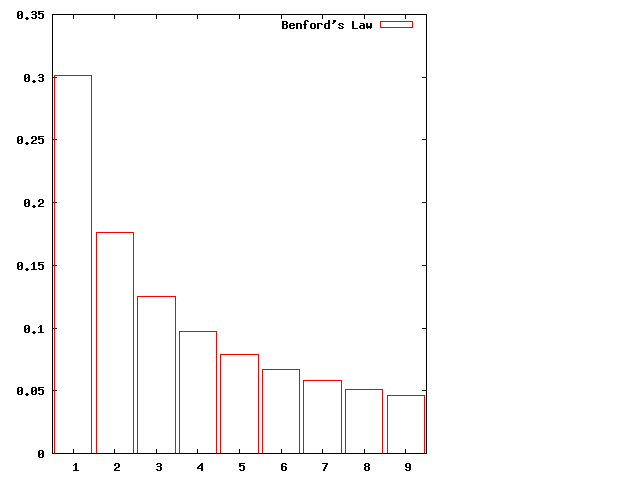
Benford’s Law is a surprising result that says data from many sources have the leading digit distributed in a non-uniform way. For example, the first digit is 1 30% of the time but 9 less than 5% of the time. To be precise, Benford’s law says that the probability of the first digit being d is given by

P(d) = log10(1 + 1/d)

The graph of the distribution makes clear how striking the result is:

http://irreal.org/blog/wp-content/uploads/2011/09/wpid-benford.png

Forensic accountants have long used Benford’s law to spot fraudulent data—typically made up numbers fail to follow the distribution predicted by Benford’s law (although, interestingly, Bernie Madoff made sure that his returns obeyed the law).

A paper in the German Economic Review entitled Fact and Fiction in EU-Governmental Economic Data by Bernard Rauch, Max Göttsche, Gernot Brähler, and Stefan Engel looks at data submitted to the European Union by countries wishing to join the EU through the lens of Benford’s law. Their analysis shows that the data supplied by the Greek government was particularly suspicious raising the tantalizing possibility that the current economic problems the EU is having with Greece could have been avoided by simply counting the leading digits of the data.

There are writeups about the paper by Tim Harford and Hans Christian Müller if you want some more information. Benford’s law is a fascinating piece of arcana and it’s always enjoyable to see it in action.

Posted in General | Leave a comment

More SSH Tricks

Tycho Garen has a nice post with some SSH tricks to make your life easier. This serves as an excellent follow on to my previous post on the subject. There’s a bit of overlap but enough new material that it’s worth a read if you regularly use SSH.

Posted in General | Tagged | Leave a comment

Emacs Keybindings for Mac OS X

As many Mac OS X/Emacs users know, OS X has many of the Emacs key bindings defined for the entire system. Thus, bindings like 【Ctrl+f】, 【Ctrl+b】, 【Ctrl+a】, 【Ctrl+e】, 【Ctrl+k】, 【Ctrl+y】, 【Ctrl+p】, 【Ctrl+n】, and a few others work across the whole system.

Less well known is that the Cocoa Text System is customizable and you can add other Emacs bindings to make a comfortable and familiar environment whether you’re in Emacs, Mail, Safari, or whatever. Even better is that Jacob Rus has already compiled the necessary bindings for you so all you need do is download the file and install it in the proper place on your system.

The full explanation is available here but the TL;DR is:

  1. Download the bindings file.
  2. Rename the file to DefaultKeyBinding.dict.
  3. Stash the file into the ~/Library/KeyBindings folder.

There’s lot of information at the site, though, so it’s well worth a look. It has bindings with 【Esc】 rather than 【⌥ Opt】 as the 【Meta】 key, BBEdit key bindings for any heretics reading this, and many other tidbits as well. But if you just want Emacs key bindings where 【⌥ Opt】 is the 【Meta】 key, then just follow the 3 steps above.

Posted in General | Tagged | 4 Comments