
Password Advice

There’s been a lot of snark going around the last few days over this password help screen from the Texas Attorney General’s Child Support Services Web Page. Child Support Services are, of course, doing the best they can to preserve the privacy of the children involved but their rules for passwords display some fundamental flaws:

  • An entropy limiting hard limit of exactly 8 characters.
  • Limiting special characters to @, #, and $.
  • Additional rules that are there ostensibly to increase entropy but actually decrease it by limiting the number of patterns a legal password can have.
  • Not hashing the passwords so they can enforce password reuse rules.

All this is standard stuff that I and many many others have written about before.

Sadly, those of us writing about the issue are not blameless either. In an otherwise excellent post, Rituraj over at Random Ramblings says that the scheme, recommended by the famous xkcd cartoon, of using random dictionary words is “…surely difficult to crack using brute force. But can be cracked using dictionary attacks.” Presumably he thinks this because the words are in a dictionary and hence known1.

But it’s not true that knowing the dictionary from which the words are drawn makes the password vulnerable to a dictionary attack anymore than knowing the letters from which a “normal” password is composed makes it vulnerable to a dictionary attack. Suppose you had a list of 94 words that you use to make your multiword password and suppose that you use 6 words in your password. Then you have 946=689,869,781,056 possible passwords. Now suppose you choose a six character password from the 94 possible characters on the typical keyboard. Again, you have 946 possibilities so there’s no difference between the systems. But, you say, you know the 94 words so you can mount a “dictionary attack,” whatever that means. The same is true of the second method: you know the 94 characters so you could mount an exactly analogous dictionary attack if one existed. In the first case you have an alphabet of 94 words (just think of them as symbols) and in the second you have an alphabet of 94 characters. It’s exactly the same thing.

Now let’s be a bit more realistic. The Unix list of dictionary words (/usr/share/dict/words) on my machine is 235,886 words long. After folding case and eliminating duplicates it’s 234,371 words long. If we choose 131,072 (=217, the highest power of 2 less than 234,371) of those words, a password of 4 random words from the list would have 72 bits of entropy as compared to just over 26 for a 4 character password (remember that increasing the entropy by 1 doubles the strength so this is a big difference). If we use the more realistic 6 symbols for each password we get 102 bits of entropy for 6 words as compared to just under 40 bits for the 6 characters. We’d need a password of about 16 character to match the strength of the six word password.

Rituraj rightly notes that one of the problems with the Child Support Services password policy is that it tends to require hard to remember passwords and so the user faced with several such passwords will pull out the Post-its and completely destroy all security. Troy Hunt has posted on this problem (my commentary here) and says that the only viable method is to use a password manager and a single high-entropy password for it. This is, I think, correct but good luck trying to get your average user to implement it; password and 123456 are so much easier.
Footnotes:

1 I’m not picking on Ritaraj here. His post is, by and large, a good one and this mistake is distressingly common.

Posted in General | Tagged | Leave a comment

Error and Restarts in Common Lisp

Robert Smith over at Symbo1ics Ideas has a very nice introduction to restarts in Common Lisp. Restarts are a part of the CL error system (more accurately, part of the CL condition system) and provide a way to recover from errors even if they happen in code that is far away from where the error is handled. The example that Smith gives assumes that the code where the error occurs is in a third party library but that the vendor has provided scaffolding to allow graceful recovery from errors.

If you’re new to Lisp or if you aren’t a Lisp user but want to see how error handling can be done right, head on over and take a look at Smith’s post. If you want more after reading Smith’s post, Chapter 19 of Peter Seibel’s excellent Practical Common Lisp gives a reasonably comprehensive introduction to the Common Lisp condition system.

Posted in Programming | Tagged | Leave a comment

The Emacs comment-dwim Command

I really like the Emacs comment-dwim command. The dwim—do what I mean—neatly captures the idea of the command. It looks at the context in which it is called and then does the right thing™. Most often, I highlight a region that I want to comment or uncomment and then just call 【Meta+xcomment-dwim to comment or uncomment the region. It’s very handy for temporarily commenting out a block of code or for turning a paragraph of explanation into a comment without having to worry about adding a comment indicator on each line. The correct comment character, as determined by the mode, is used to mark the comment.

I use the excellent smex so I normally just start typing dwim and the proper command comes up. There’s also a keyboard shortcut, 【Meta+;】, that’s pretty easy to remember and that I’m trying to use more often.

Although I find comment-dwim most useful for working with regions, it also does the right thing on single lines or even empty lines. See the documentation for the details. If you use the keyboard shortcut, it’s a one-size-fits-all method for inserting or deleting comments.

Posted in General | Tagged | 1 Comment

Recursive Greps

I’ve been using the Unix grep utility for over 20 years but today I learned something new. Mikko Ohtamaa over at Open Source Hacker has a nice post on Power searching using UNIX grep. The post explores some of the enhancements to the GNU version of grep. These days, even Mac OS X comes with GNU grep so it’s a worthwhile read.

One of the things you often to do with grep is to search recursively into subdirectories but the older versions had no way of filtering on file type. Thus, you could say something like

grep -R foo ~/projects

to search through the projects subtree but there was no way to specify which files you wanted to consider. If there were binary files under the projects subdirectory you would search them too. Fortunately, GNU grep has a way around this. If we want to search just C files we would specify something like

grep -R --include="*.c" foo ~/projects

It’s hard to believe that I didn’t know about this after all the time I’ve been using grep. My only defense is that I learned grep early on and had little reason to revisit the documentation. In any event, it’s comforting to know that my education is ongoing.

Posted in General | 6 Comments

The Social Network of a Word

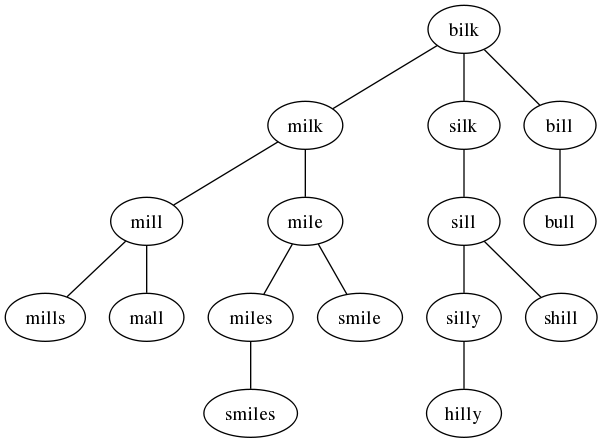
I ran across an interesting interview question the other day: Given a base word and a list of other words, use the Levenshtein distance to find the social network of the base word in the list of other words. More specifically, we call wordb a friend of worda if the Levenshtein distance between them is 1. The problem is to start with the base word, find all its friends in the other list, then find all the friends of the friends, and so on. This problem is representative of a large class of related problems (such as The Six Degrees of Kevin Bacon) so it’s worthwhile considering how to solve it.

The Wikipedia article on Levenshtein distance has a straightforward pseudocode implementation of an algorithm to find the Levenshtein distance between two words that I translated directly into Lisp. I won’t bother showing the code since it’s pretty much a one-to-one translation.

The basic strategy is to do a breadth-first search of the base word’s social graph. We don’t have the graph, of course, that’s what we want to find. Instead, we build it up piece by piece. The main tool for doing breadth-first searches is a queue or FIFO. I’ve disussed these and given an implementation before. The implementation at the link is in Scheme but it’s trivial to convert it to Common Lisp. Again, I won’t bother showing the Lisp implementation.

With those two pieces in place, it’s pretty easy to implement the algorithm to find the social network.

 1:  (defun social (word words &optional graph)
 2:    "Find the social graph for word in the population words"
 3:    (let ((inside (make-instance 'queue))
 4:          (outside (make-instance 'queue :initial-contents words))
 5:          (new-outside (make-instance 'queue))
 6:          (results (list (cons word 0)))
 7:          nodes)
 8:      (pushq (cons word  0) inside)
 9:      (do ((datum (popq inside) (popq inside)))
10:          ((null datum) (if graph (sgraph (reverse nodes)) (reverse results)))
11:        (destructuring-bind (word . distance) datum
12:          (do ((potential-friend (popq outside) (popq outside)))
13:              ((null potential-friend))
14:            (if (= (levenshtein word potential-friend) 1)
15:                (let ((friend (cons potential-friend (1+ distance))))
16:                  (pushq friend inside)
17:                  (push friend results)
18:                  (push (cons (car datum) potential-friend) nodes))
19:                (pushq potential-friend new-outside))))
20:        (rotatef new-outside outside))))

The implementation uses 3 queues:

  • The outside queue that holds words that have not yet been identified as friends. It’s initial value is the list of other words.
  • The inside queue that holds friends that are waiting to be processed. It is initialized to the base word with a distance (from the base word) of zero at line 8.
  • The new-outside queue that holds words from the outside queue that aren’t friends of head of the inside queue.

The main loop pops off the head of the inside queue at line 9 and checks each word on the outside queue to see if it is a friend. If it is, it adds that word and its distance from the base word to the end of the inside queue (line 16), it adds the same to the results list (line 17), and finally adds the two words being compared onto the nodes list (line 18). If the word being checked is not a friend, it is pushed onto the end of the new-outside queue.

When the outside queue is empty, it is swapped with new-outside and the main loop starts over. When the inside queue goes empty, the process is complete. Assuming graph is NIL, the results are returned.

If *words* is given by

(defparameter *words* '("milk" "silk" "mill" "mails" "mills" "miles" "silly"
                        "smiles" "smile" "mile" "sill" "hilly" "shill"
                        "mall" "bill" "bull"))

and the base word is bilk, the results of a run are:

SOCIAL> (social "bilk" *words* )
(("bilk" . 0) ("milk" . 1) ("silk" . 1) ("bill" . 1) ("mill" . 2) ("mile" . 2)
 ("sill" . 2) ("bull" . 2) ("mills" . 3) ("mall" . 3) ("miles" . 3)
 ("smile" . 3) ("silly" . 3) ("shill" . 3) ("smiles" . 4) ("hilly" . 4))

Thus “milk” is a direct friend of “bilk” and “mills” is a friend of a friend of a friend.

We can see the network more clearly by specifying graph as t. That causes social to call sgraph to output a dot program to produce a graph. Here’s sgraph:

(defun sgraph (edges)
  "Output a dot program for the social graph of word in words."
  (with-output-to-string (stream)
    (format stream "graph G { ~%")
    (mapc (lambda (e) (format stream "~a -- ~a~%" (car e) (cdr e))) edges)
    (format stream "}~%")))

For our example, this produces the program

graph G { 
bilk -- milk
bilk -- silk
bilk -- bill
milk -- mill
milk -- mile
silk -- sill
bill -- bull
mill -- mills
mill -- mall
mile -- miles
mile -- smile
sill -- silly
sill -- shill
miles -- smiles
silly -- hilly
}

which produces the graph

http://irreal.org/blog/wp-content/uploads/2012/06/wpid-social.png

Posted in Programming | Tagged | 3 Comments

Scrolling with Lion, Redux

As I wrote yesterday, my laptop recently had major surgery. That appears to have gone well but when I got the machine back I noticed that it had Snow Leopard installed instead of Lion. I knew they were going to wipe the drive so I wasn’t surprised by the fresh install but I was surprised that they had installed OS X 10.6 instead of OS X 10.7. I called Apple to see why they had done that but the tech didn’t have any idea why it happened. My guess is that the tech who did the work thought the machine was too old for Lion, although that is not the case.

In any event, it was easy to download and install Lion again so that wasn’t much of a problem but while I was working with Snow Leopard I noticed that the screen scrolling had reverted to the classical (pre-Lion) action—swiping down with 2 fingers moved toward the bottom of the screen etc. When I first installed Lion, one of the things that really impressed and pleased me was the new scrolling method. I really liked it and got used to it almost immediately. Now, here I was back with the old method and it really drove me crazy. It just seemed so unnatural. Irreal readers who don’t use Macs will wonder what all the fuss is about but I can tell you that once you’ve used the new method, going back to the standard way is torture. The metaphor of grabbing the screen and pushing it in the direction you want to go is very natural and fades into the background almost immediately. When I was stuck using the old method, it felt like I had suddenly been teleported to a Bizaro world where everything worked backwards.

I’ve only been using the new scrolling for about 10 months but it has become so ingrained that using something else is unsettling. Keep in mind that I’d been using the standard method for years and years but had no trouble adapting to the new way. Now going back seems like torture. That’s how we know Apple got this one right.

Posted in General | Tagged | Leave a comment

Back!

Annnnnd, I’m back. For the one or two of you who may have wondered were I’ve been, here’s the story. Last month, between the fifteenth and twentieth, I was in New York. I didn’t have to a chance to queue up any posts but it was only 6 days and I was confident that you all could find something to amuse yourselves in some other corner of the Internet. The real problems came when I got back; two things occurring together conspired to take me offline for almost another two weeks:

  • My laptop died and Apple had to do major surgery (including replacing the logic board).
  • I got flat-on-my-back-sick with some sort of flu-like infection.

That meant that I was stuck in bed with no laptop, no way to blog, and no way to program. It was not the happiest of times. I still had my iPad, which (barely) prevented me from going insane, but it’s not the same, believe me.

In any event,things should be pretty much back to normal now and we can head out together to explore the Irreal.

Posted in Administrivia | Leave a comment

Using Quickproject

Earlier this week I wrote about Using Quicklisp and mentioned another Xach project, Quickproject (the link takes you to Github, but the best way to get it is with Quicklisp). What quickproject does is to initialize a project.asd, package.lisp, project.lisp, and README.txt files for a project. The idea, as explained in Beane’s post on building small Lisp projects, is to bootstrap a project by setting up initial versions of the files you’ll need for an ASDF loadable project.

I expected that it would be really useful to working on medium sized projects such as libraries. I’m sure it will be but today I wanted to experiment with a small, single .lisp file project. I decided to try out Quickproject to see how it would work for a really small project. It was a revelation as to how much easier it made things. I started with

(quickproject:make-project "~/lisp/levenshtein/")

then opened the ~/lisp/levenshtein/levenshtein.lisp file and started hacking. When I got finished I was able to load it with Quicklisp even though I had not configured ASDF to search ~/lisp/ for projects. I’m really impressed with how easy and useful it is. If you regularly write in Common Lisp you really need to get Quicklisp and Quickproject. They’ll make your life a whole lot more pleasant.

Posted in Programming | Tagged | Leave a comment

John Gruber On The Latest DVD Silliness

ars technica is reporting that DVDs and Blu-rays will now carry two unskippable government warnings. These warnings—the usual nonsense about going to hell and jail if you copy the DVD/Blue-ray—will be shown back-to-back for 10 seconds each and will be unskippable. Gruber deadpans

So to encourage people not to engage in piracy, they’re going to force
everyone to watch yet another annoying, time-wasting,
gratification-delaying warning screen that can only be avoided by
engaging in piracy.

Really, these notices are completely useless. If you’re going to pirate, these won’t give you a second’s pause. If, like most people, you don’t pirate movies it’s just an annoying inconvenience that make you feel sympathy for the pirates and loathing for the studios.

Posted in General | Tagged | Leave a comment

cl-test-grid

Vladimir Sedach has a post up that describes the cl-test-grid project. The idea is that Quicklisp users download the cl-test-grid, tell it what CL implementations are available, and run the test. It runs tests against many of the libraries in the latest Quicklisp release and sends the results to a public report site and a bug tracker site.

This is a way of helping library writers get their libraries tested in as many environments as possible. It seems like a good idea so if you are willing to donate a few cycles it’s a worthwhile exercise. See Sedach’s post for details.

Posted in Programming | Tagged | Leave a comment